Chatbot design guidelines
When you create a chatbot, you need to consider the following:
- Design of the chatbot: The logic or flow, guiding the end user from one dialog to the next, and the right chatbot elements to use.
- Conversation: The content of the messages, when to send the relevant messages, and the chatbot personality.
- Entry points: How the end user can access the chatbot.
Conversation
The following guidelines cover the content of the conversation, from the first message to the transfer to an agent.
Message content [#message-content-conversation]
Follow these guidelines for every message:
- Provide relevant information.
- Provide accurate information.
- Check grammar, spelling, punctuation, and capitalization.
Chat initiation and introduction to chatbot [#chat-initiation-and-introduction-to-chatbot-conversation]
The end user starts every chat. The end user sends a message, such as Hi, to the chatbot. The chatbot then responds with an initial message.
Initial message for first-time end users [#initial-message-for-first-time-end-users-conversation]
For first-time users, the initial message from the chatbot contains a greeting to the end user and an introduction to the chatbot. Example: Welcome to the official Infobip WhatsApp channel. I am Omnia. I can help you with your queries regarding our products and channels.
If AI responds to the end user directly, the chatbot must also tell the end user that they are chatting with AI. Example: You are chatting with an AI assistant. To show the disclosure automatically, turn on AI disclosure in the chatbot settings. For more information, see Turn on AI disclosure.
After you send the initial message, start the end user journey.
Initial message for returning end users [#initial-message-for-returning-end-users-conversation]
For returning end users, the initial message contains only a greeting to the end user. It does not need to contain the introduction to the chatbot. Personalize the initial message and avoid repeating the same message every time they return.
Examples:
- Welcome back. How can I help you today?
- Hi again, what can I do for you?
- Hi
{username}, nice to see you again. What can I do for you?
If AI responds to the end user directly, tell returning end users again that they are chatting with AI when they start a different session. For more information, see When the setting is not enough.
After you send the initial message, start the end user journey.
Start the journey [#start-the-journey-conversation]
You can start the journey in one of the following ways:
- Show a menu. The end user can choose an option from the menu. The chatbot routes the conversation based on the end user's selection.
Using a menu helps in the following ways:- Tells the end user how the chatbot can help
- Guides the user in continuing the conversation
- Enable the end user to ask free-form questions. For rule-based chatbots, add all expected free-form input from end users as keywords. For AI chatbots, add sufficient training phrases to make sure that the chatbot understands the intent of the end user.
- Show a menu as well as enable the end user to ask free-form questions. Use a hybrid chatbot.
The following image shows a welcome message with a menu:
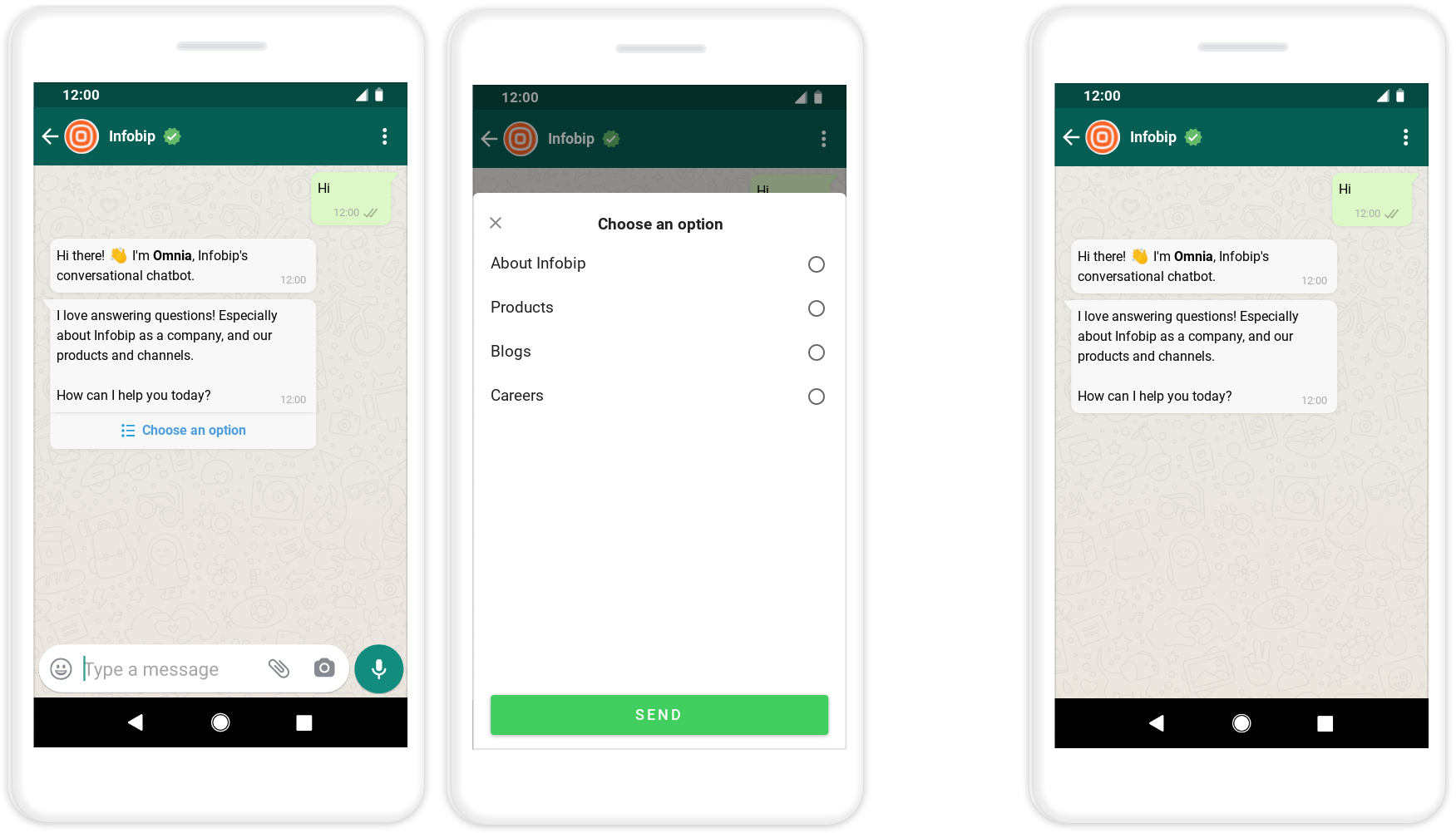
If you use a menu, do the following:
- In the menu, show 3 to 4 generic options.
- Offer guidance and give tips about how to select an option. Example: Add an explanation in the message about the menu options or provide descriptions with each menu option.
Tips [#tips-conversation]
Use the following tips for the initial message:
- Manage the end user's expectations and let them know how the chatbot can help.
- End with a clear prompt about what the end user needs to do. Example: What can I do for you? or How can I help today?
- For returning end users, do not be redundant or provide excessive explanation. The initial message must not be long. The message must show that it recognizes the end user as a returning user.
- Focus on the end user's request.
- Avoid being chatbot-centric.
- Do not tell the end user that the chatbot is incompetent.
- Do not ask the end user for help or feedback in the initial message.
Examples:
- Incorrect: Hi, my name is Omnia. I am still learning. So, please help me by giving feedback after our conversation.
- Correct: Hi, I am Omnia. What would you like to know about Infobip?
End the conversation [#end-the-conversation-conversation]
You can end a conversation in the following ways:
- Encourage further conversation: Depending on the purpose of the chatbot, encourage further conversation. Example: If you have a chatbot through which end users can purchase your products, you might want the end users to continue the conversation.
You can use messages such as the following:- Can I help you with something else?
- Is there anything else that you would like help with?
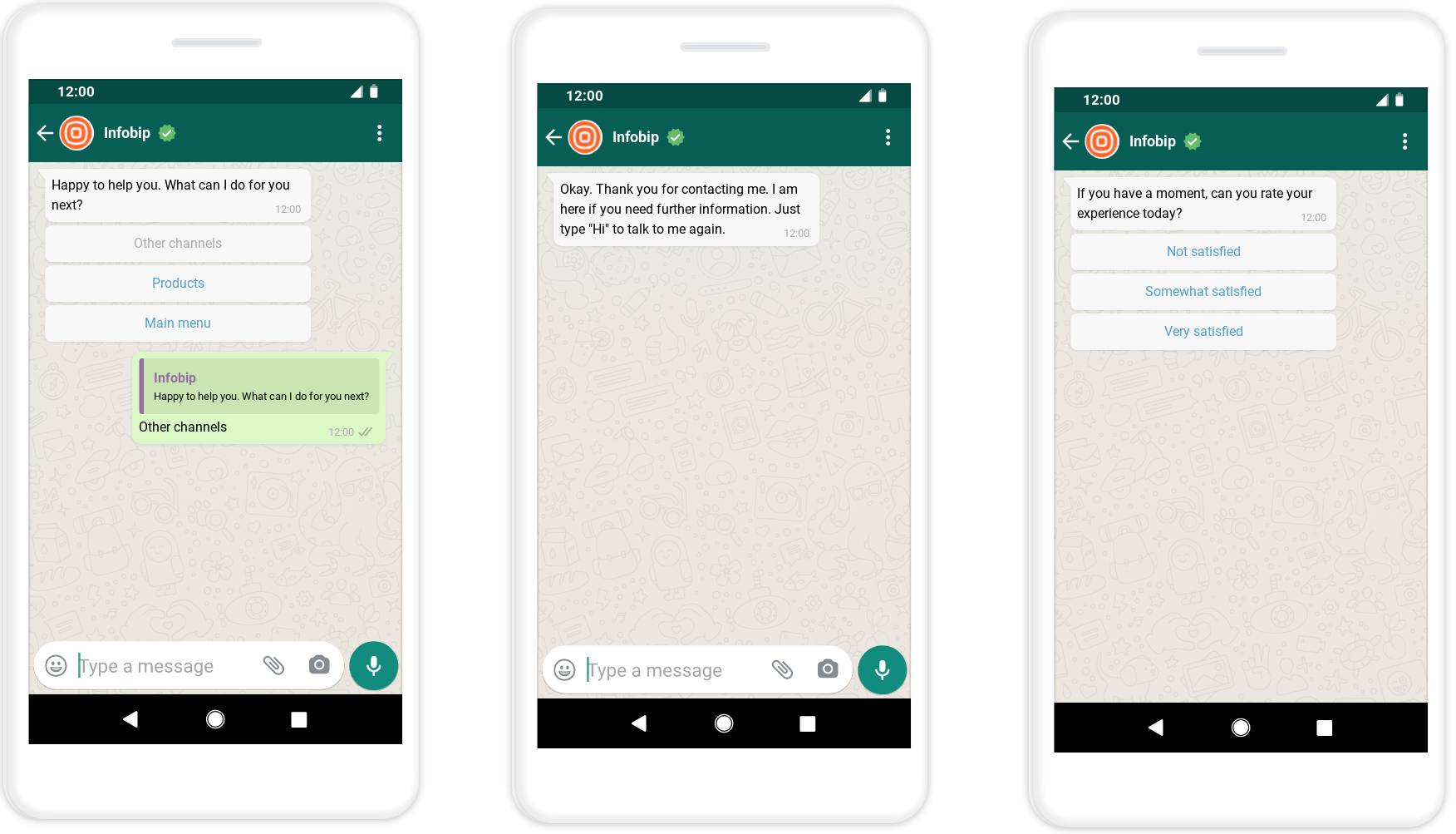
- Thank the end user and end the conversation: If the end user does not want to continue the conversation, thank them. Encourage them to revisit and share instructions about how to contact the chatbot again.
- Collect feedback: Ask at the correct time to avoid losing the end user. Do not ask too early or too late. Make sure that you have addressed all their queries before you ask them for feedback.
The following image shows a closing message:
Chatbot break messages [#chatbot-break-messages-conversation]
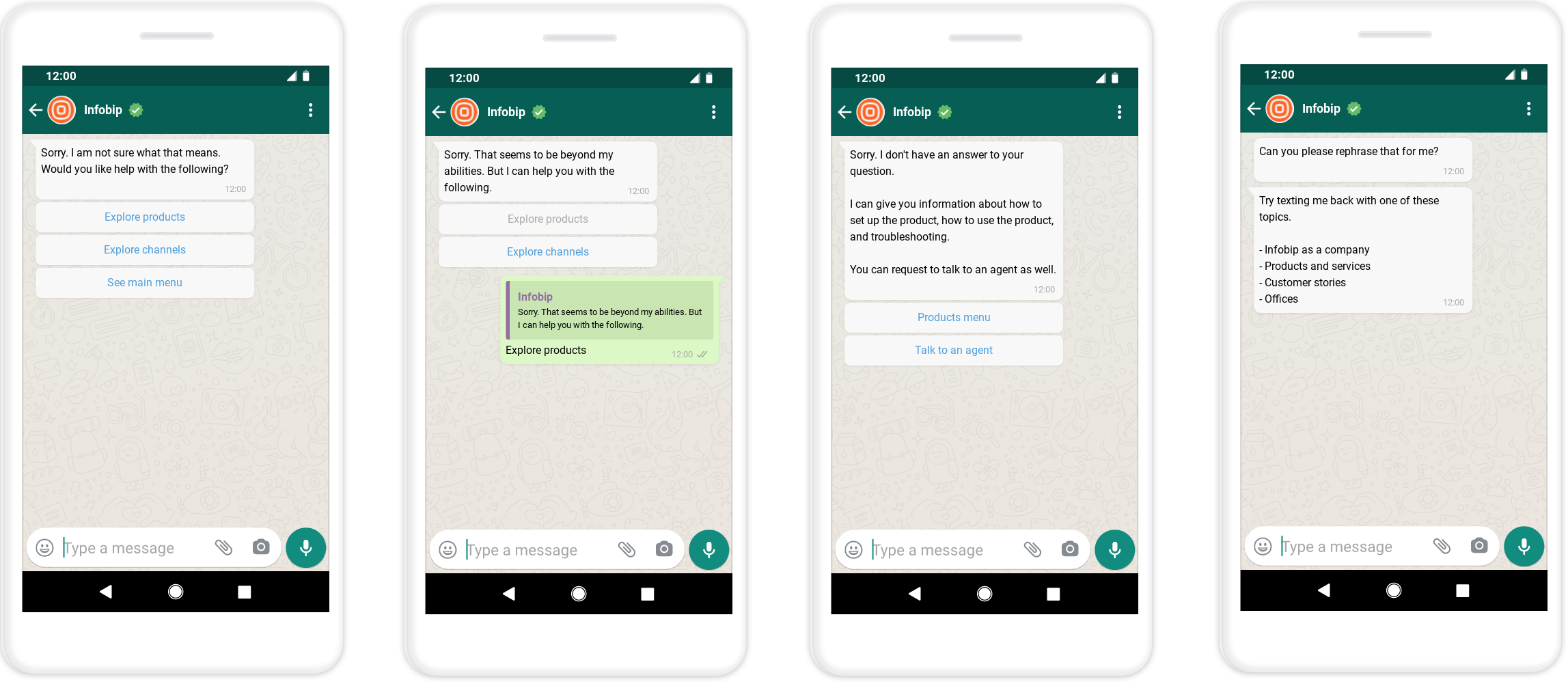
Sometimes, an end user might send a message that the chatbot does not understand. The end user might also ask a question that is out of the scope of the chatbot. In such cases, acknowledge that the chatbot cannot help. Redirect the end user to either the main menu or a different conversation flow.
In other cases, the end user might not respond to the chatbot or provide incorrect information.
These issues can occur at any time during the conversation.
You can do the following:
- If the chatbot cannot understand the end user's question, apologize, and help the end user by suggesting alternatives. Example: Unfortunately, I could not find a branch office near your location. Do you want the location of the nearest ATM?
- If the end user provides an incorrect response, ask the end user to send the correct response. Example: Sorry, I could not find the address that you provided. Would you like to try again?
- If the end user's question is out of the scope of the chatbot, apologize and help the end user by stating what the chatbot can do.
- Offer them the option to talk to an agent.
- Request them to rephrase their question.
The following image shows a break message:
Tips [#tips-chatbot-break-messages-conversation]
Use the following tips for break messages:
- Follow apologies with suggestions for the next steps.
- Do not apologize too much.
- Do not highlight the shortcomings of the chatbot.
- Design fallback prompts for cases where the chatbot cannot understand the end user's message. These are messages that explain how the end user can proceed with the conversation. Example: Choose an option from the menu.
- Use variations of fallback and error messages so that the conversations seem natural and humanlike.
Transfer to agent [#transfer-to-agent-conversation]
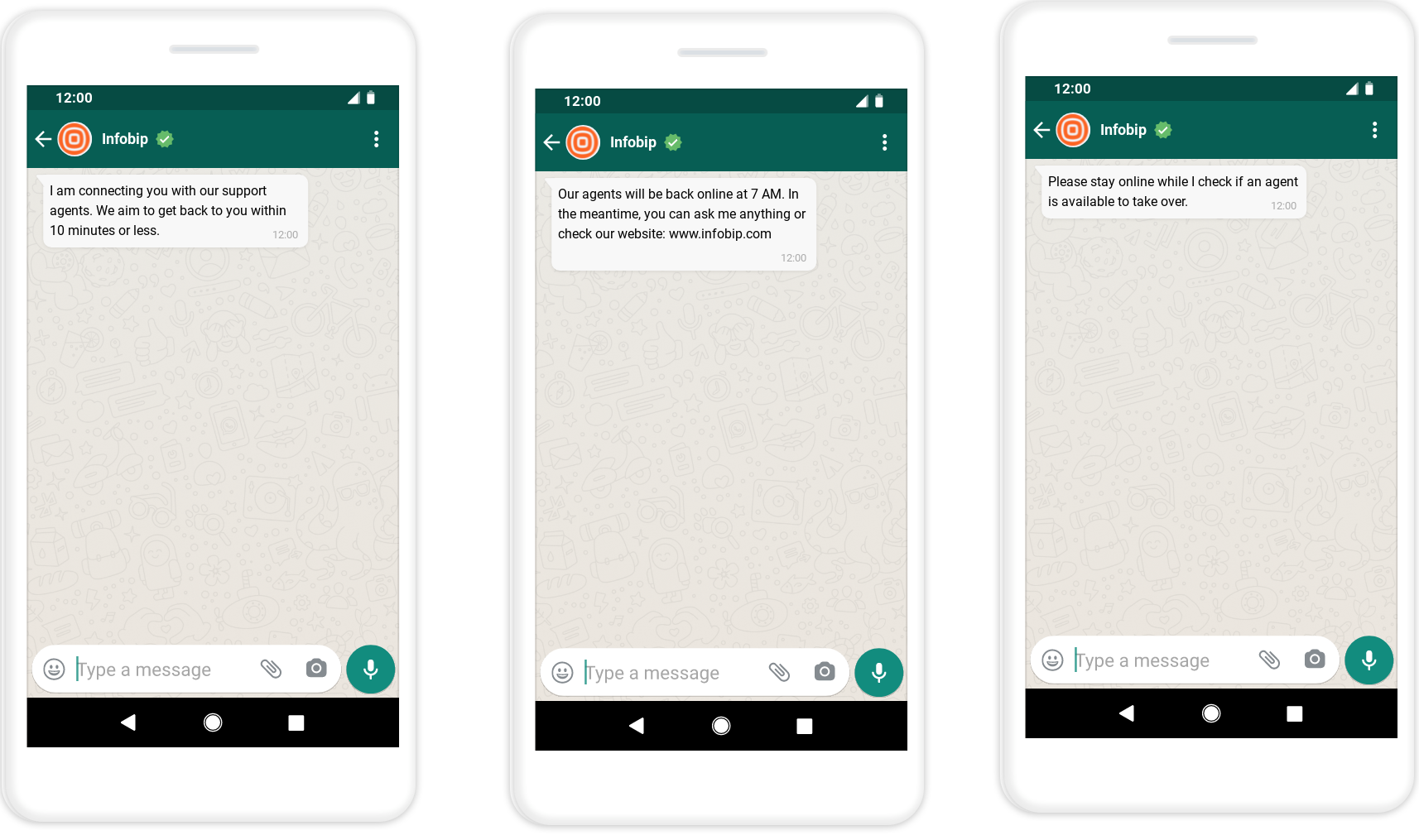
When transferring a conversation from the chatbot to an agent, it is important to be transparent and manage the end user's expectations.
Be cautious about offering the option to contact an agent. Too many agent transfers increase the number of conversations that agents handle and the cost of customer support.
Tips [#tips-transfer-to-agent-conversation]
Use the following tips for agent transfers:
- Offer agent transfers only for use cases that are better handled by agents.
- Do not make agent transfers a default or mandatory process. Offer the end user the option to talk to an agent. Transfer to an agent only if the end user accepts.
- Before transferring to an agent, collect information that will help the agent handle the conversation more efficiently. Example: Information about the end user and the reason for contacting the chatbot.
- Let the end user know what is happening.
Examples: I will contact the agent. or I am checking if an agent is available. - Give an approximate expected waiting time. It is better to slightly overestimate the waiting time than underestimate so that you set the correct expectations.
- Use the waiting time to get more information about the end user or the reason for contacting the chatbot.
Example: In case the information that the chatbot has already obtained is not clear enough for the chatbot to understand the context to connect to an agent. - Give updates about the status and waiting time.
Example: Sorry. All the agents are busy. The waiting time is 4 minutes. - Inform end users about agent availability to set expectations.
Example: We are finding an agent to get an answer to your query. The waiting time is 2 minutes. - Give fallback options if agents are not available. Example: Link to a relevant webpage, direct to an FAQ section in chatbot.
The following image shows an agent transfer message:
Obtain opt-in [#obtain-opt-in-conversation]
When end users initiate a conversation with the chatbot, you have a 24-hour window to respond to the end user. You do not need to obtain an opt-in to respond.
But if you want to initiate the conversation or respond outside the 24-hour window, some channels, such as WhatsApp, require that you collect opt-ins.
When an end user contacts your chatbot, you can ask them to opt in during the conversation. You can then send them business-initiated messages such as marketing campaigns, promotional offers, and reminders. Example: Hey, did you know that our sale ends today? Hurry up and get a 20% discount!
Follow these guidelines when you collect opt-ins:
- Opt-in messages must be clear and transparent. State that the end user is opting in to receive messages from the business over the channel.
- State the name of the business from which the end user is opting to receive messages. You can also display the business name as the sender name.
- Comply with regional regulations and channel guidelines.
- Obtain opt-ins as a natural extension to the conversation.
- Tell the end user about the benefits they get if they opt in.
- Add an option to enable the end user to opt in later to make sure that a potential lead is not lost. Example: Add a maybe later option.
- Include a check for opt-in in initial dialogs.
- Let end users know how to opt out.
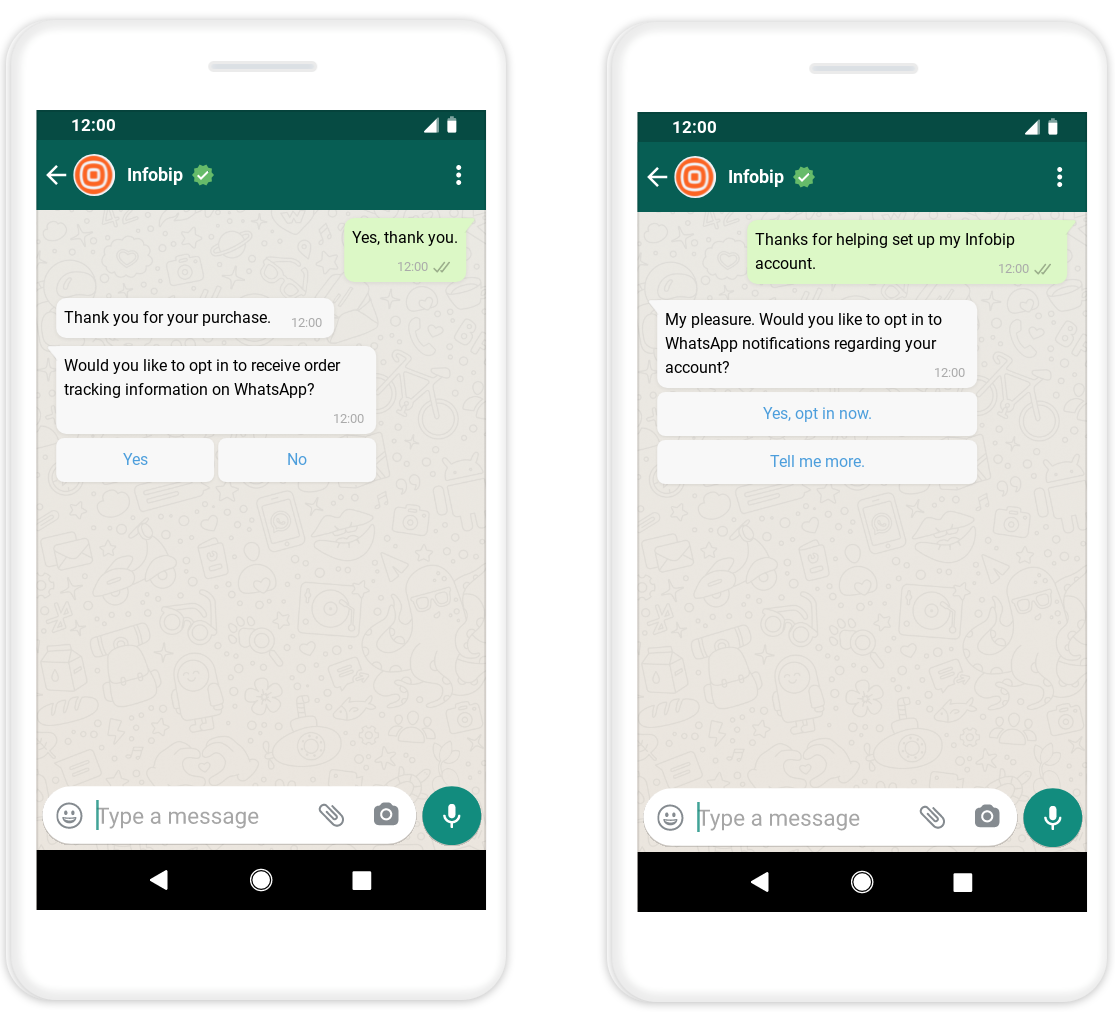
The following image shows an opt-in message:
Add terms and conditions [#add-terms-and-conditions-conversation]
Add a message telling end users that by proceeding with the conversation with your chatbot, they agree with your terms and conditions. Add a link to the terms and conditions.
Conversation guidelines [#conversation-guidelines-conversation]
Use the following guidelines to write chatbot messages.
Focus on the end user [#focus-on-the-end-user-conversation]
Example: Use you instead of I.
Be clear and concise [#be-clear-and-concise-conversation]
Use precise and simple words. Avoid unnecessary details but convey the required information effectively.
Use short sentences [#use-short-sentences-conversation]
Short sentences are easier to read. Remove as many words in the message as possible but keep the core message. Make sure that the changes align with the chatbot persona and the conversation tone of your brand.
Examples:
- Original: Do you want more conversions on your website?
- Shortened sentence: Want more conversions?
Use active voice [#use-active-voice-conversation]
Use active voice instead of passive voice. Active voice is more direct and focuses on the end user.
Add context [#add-context-conversation]
Use information that you already have about the end user to make messages relevant. Example: Use attributes to address the end user by name or to refer to their previous order.
Format the text [#format-the-text-conversation]
Format the text to make it easy to read. Example: Use line breaks, and use bold font for important information.
Ask questions [#ask-questions-conversation]
Questions keep end users engaged throughout the conversation.
Questions are also important for gathering the information that you need to help the end users. Example: What is your preferred method of contact?
Use transitional prompts [#use-transitional-prompts-conversation]
Encourage end users to respond by using transitional prompts, such as questions. If you lead end users to a dead end, they are likely to abandon the conversation, which may result in a poor reflection of your support services.
Use hints [#use-hints-conversation]
Hints help the end user move through the chatbot.
Use hints to guide the end user to do the following:
- Get back to the main menu or the previous menu.
- Restart the conversation.
- Choose an option from a menu.
- Respond or send a message to the chatbot.
- Share data correctly. Example: Use the correct format for the phone number or email address.
When you add hints, consider the following:
- The positioning of the hint in the message from the chatbot.
- The positioning of the hint in the chatbot journey.
- The hint structure.
- Specific formatting. Example: The like_bulb emoji, bold formatting of the text.
Be consistent in the entire chatbot journey so that end users can identify hints easily.
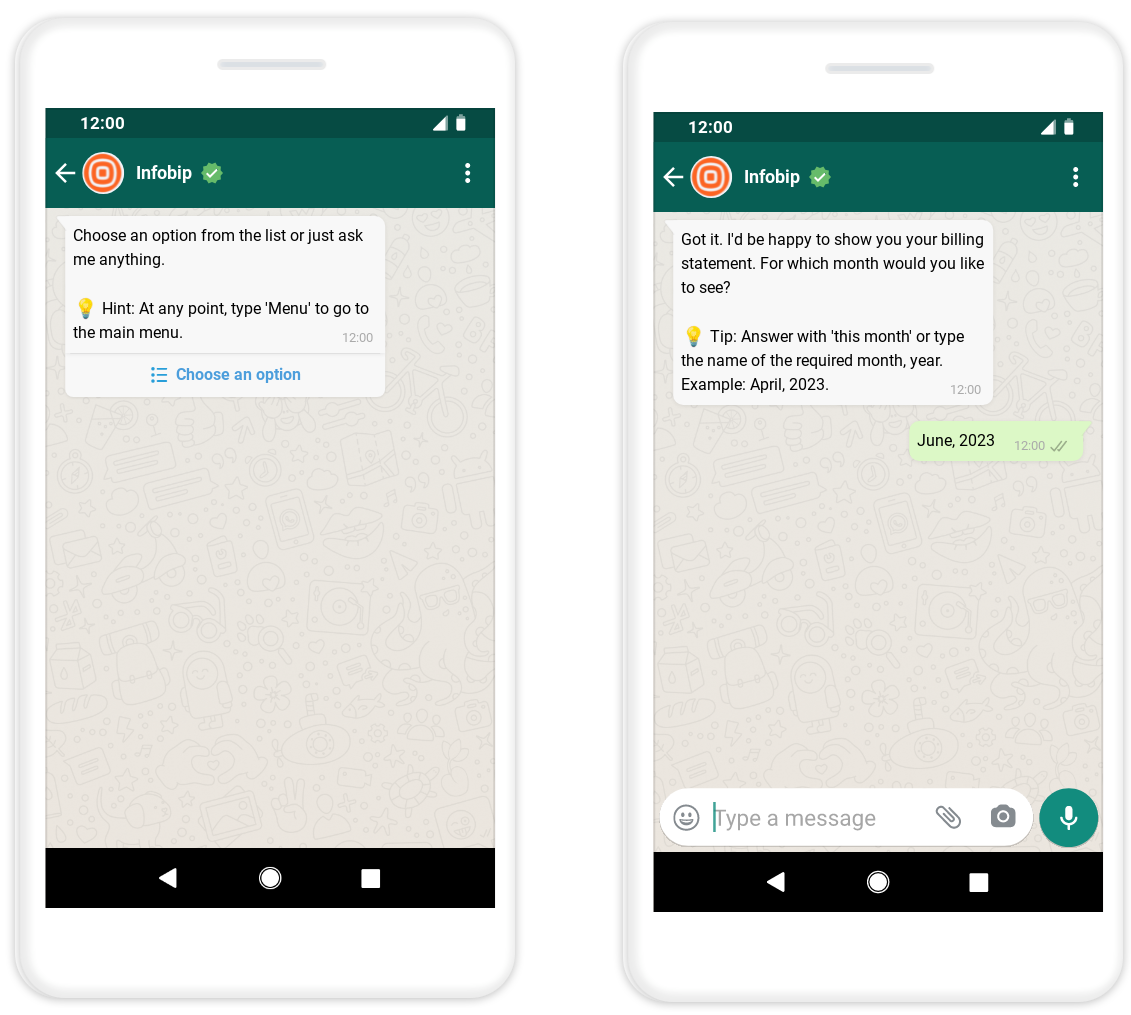
The following image shows a hint in a chatbot message:
Give suggestions [#give-suggestions-conversation]
Give suggestions to guide end users with your products and services.
Example: If you are also interested in a credit card, I can show you your preapproved options. Would you like to see them?
Acknowledge messages [#acknowledge-messages-conversation]
Let end users know that you have received their messages, have understood their requests, and are working on the requests.
Examples:
- OK
- Got it! Let me get that information for you.
- Sure
- Alright
- Excellent
- Great
- Wow
- Super
Provide confirmation [#provide-confirmation-conversation]
Provide confirmation to let end users know that you handled their query.
Example: Now that we have checked your balance, is there anything else I can help you with?
Add variety [#add-variety-conversation]
Adding variety makes interaction more engaging and natural. When possible, define variants of responses, fallback messages, or acknowledgements.
Use emojis and images [#use-emojis-and-images-conversation]
Use emojis, gifs, and images when it is appropriate. They make the conversation less strict and formal, and improve end user experience. The type of these elements and the frequency of usage must align with the chatbot personality and the conversation tone of your brand. Do not use too many such elements because it can make it seem like the chatbot is not serious enough.
-
Do not use emojis as a replacement for words, but as an addition.
-
Add a space before an emoji.
-
Do not use emojis as a replacement for punctuation. Instead, use the relevant punctuation.
Examples: -
Correct: Do you mean that you want to delete it?
-
Incorrect: Do you mean that you want to delete it 🤔
Use informal phrases [#use-informal-phrases-conversation]
Use informal phrases to make conversations sound natural.
Examples:
- By the way
- Above all
- Fortunately
- Right
- Anyway
- In that case
- Actually
- In other words
- Consequently
- One more thing
Convert commands into hints [#convert-commands-into-hints-conversation]
Do not give orders to end users when you want to ask them to respond or decide what they want to do next. Instead, give hints.
Examples:
- What can I help you with next?
- Choose an option.
Use a relevant tone [#use-a-relevant-tone-conversation]
Use a tone that is relevant to the situation.
Example: Use one tone for an end user who asks about their account balance. Use a different tone for an end user who contacts you about a stolen credit card. For the stolen credit card use case, you might need to express concern and offer assurance in addition to taking the necessary action.
Design a chatbot personality [#design-a-chatbot-personality-conversation]
You can design the personality of your chatbot depending on how you want end users to perceive the chatbot. Adding a personality increases the chances of end users liking your chatbot and adds to the user experience. Designing the personality also adds consistency throughout the chatbot.
Use natural, real-life, human conversation format. But do not tell the end user that the chatbot is a human.
When designing the personality of the chatbot, consider the following:
- Target audience: Adapt the language and style based on your audience.
- Brand tone: Use the same communication style that you already use to communicate on other platforms. Determine how you want end users to perceive your business and implement it in your chatbot.
- Chatbot tone: Determine the tone for the chatbot. Example: friendly, calm, professional, modern, enthusiastic, direct, or formal. The tone adds to the user experience. Example: Oh sure! Understood! Let me get to it right away!
- Chatbot name
- Relationship between the chatbot and end users: Example: friendly, peer, professional, or coach.
- Background of the chatbot: Example: origin, age, character, and gender.
You can also play with the pitch and accent of your chatbot while writing copy or editing your dialogs.
Entry points
Plan how end users reach your chatbot:
- Define chatbot entry points on different channels that you use.
Example:- Organic entry points: website, social media, telephony, business search, app
- Paid entry points: ads, traditional advertising such as billboards and posters.
- Identify the means of contact for these entry points. Example: QR codes and links.
Design
All chatbots follow a flow or logic for the design. The complexity of the logic depends on the use case and type of chatbot. Example: An FAQ chatbot may be simpler than a chatbot that is integrated with a third-party database and uses authentication to handle sensitive data.
How to design dialogs [#how-to-design-dialogs-design]
Follow these guidelines when you design dialogs:
- Use simple dialogs.
- Group similar dialogs together.
- Use relevant names for dialogs. It helps in the following ways:
- Makes it easier for chatbot designers to move through the chatbot.
- Helps understand the design when viewing analytics.
Enable user authentication [#enable-user-authentication-design]
Make sure the chatbot can handle all scenarios for all types of end users.
Example: If you have both registered and unregistered end users, make sure of the following:
- End users who need to register can do so.
- Unregistered end users use user-independent dialogs.
Determine whether to use predefined messages or free-form text [#determine-whether-to-use-predefined-messages-or-free-form-text-design]
Choose the type of end user input that suits your chatbot. You can use predefined messages, free-form messages, or both.
Predefined messages [#predefined-messages-design]
Predefined messages are less conversational than free-form text.
Where relevant, use predefined end user responses such as numbered menus, lists, and reply buttons. Predefined responses help with the following:
- Help the end user choose the correct response.
- Enable the chatbot to understand and process the end user's messages.
- Reduce the risks of spelling mistakes.
- Eliminate the need for end users to type a response.
- Use especially for transactional chatbots.
Free-form messages [#free-form-messages-design]
Free-form input enables more natural and conversational interactions.
This option is applicable for AI chatbots.
For the chatbot to recognize free-form messages correctly, the chatbot needs to be trained well. See the guidelines for AI chatbots.
Choose relevant chatbot elements [#choose-relevant-chatbot-elements-design]
Choose a chatbot element that is more useful and relevant for the purpose.
Examples:
- Choose a list or reply buttons instead of a numbered menu.
- Determine whether you want to use a list or reply buttons for menu items.
Design considerations [#design-considerations-design]
The chatbot cannot process messages while an element is running. Example: The chatbot is waiting for a response from the Webhook element, or the Delay element is running. If the end user sends any messages during this time, the chatbot ignores these messages. So, take this into consideration when designing the chatbot.
Was this page helpful?