Understanding resources and associations
Resources are Infobip communication assets (phone numbers, sender IDs, email domains) that you purchase, register, and use to send traffic. CPaaS X enables you to associate both resources and traffic (inbound and outbound) with applications and entities for invoicing, reporting, and routing purposes. Learn how to acquire, associate, configure inbound handling, and use resources for outbound messaging in CPaaS X.
What are resources [#what-are-resources]
Resources are general Infobip communication assets:
- Phone numbers: Virtual long numbers (VLNs), short codes, toll-free numbers for SMS, MMS, and WhatsApp
- Alphanumeric sender IDs: Text identifiers for SMS
- Email domains: Registered domains for email sending
- Digital channel senders: Viber, RCS, Messenger, Telegram, Instagram, and other digital messaging platform accounts
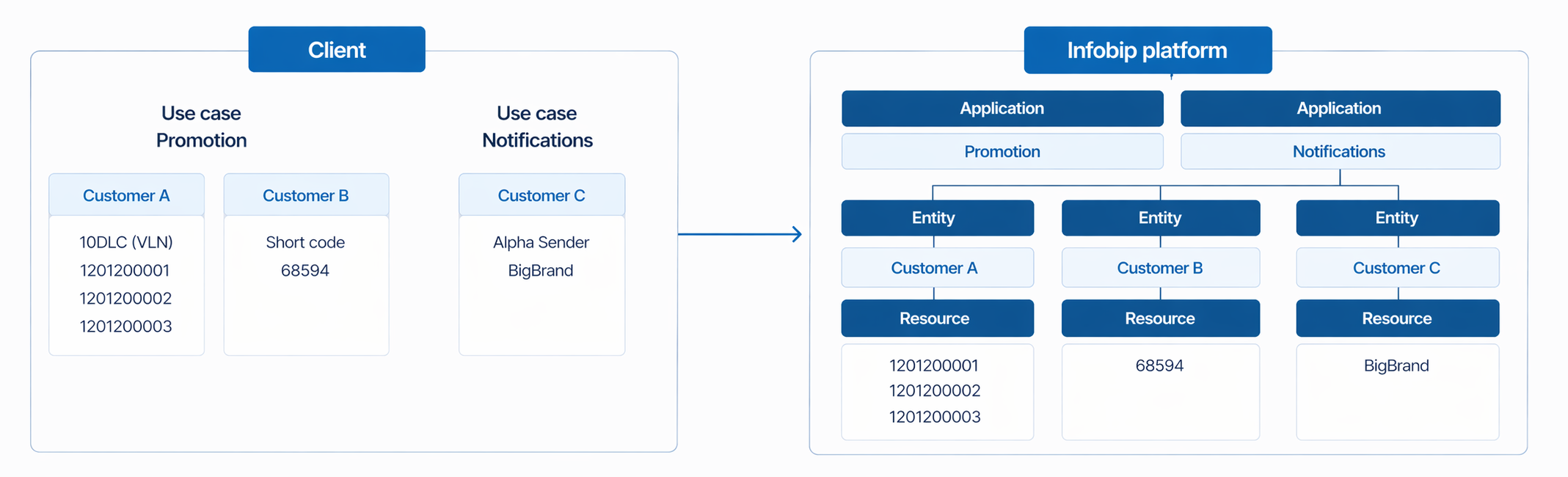
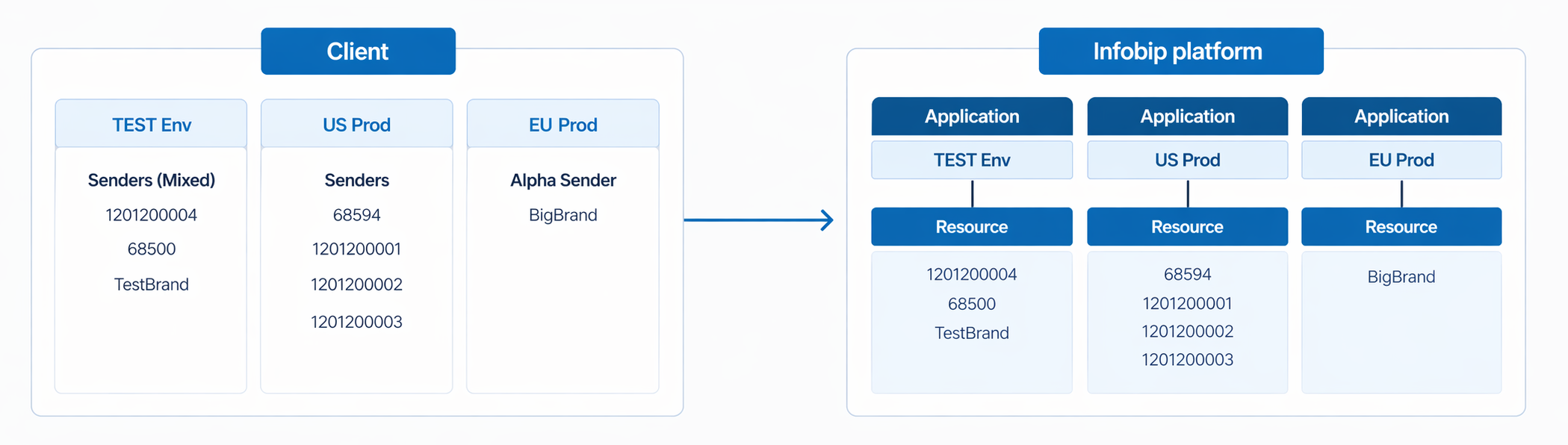
The following diagram shows the available resource types, where the client has customers using different use cases and resources.

Resource acquisition and association [#resource-acquisition-and-association]
When you purchase or register a resource, it is unassociated by default unless you specify an association in the same request. You can adjust the association later if your setup changes, but the change applies from that point forward only and is not applied retroactively to past traffic. You can associate with:
- Specific application and specific entity: Attribute the resource to a specific customer within a specific environment.
- Specific application and any entity: Attribute the resource to an application without restricting it to a single entity.
For phone numbers and alphanumeric sender IDs, association enables cost allocation per customer. If you want to track and invoice resources separately to different applications and/or entities, you must associate the resource during acquisition. These resources have setup and recurring fees that can then be attributed and billed accordingly.
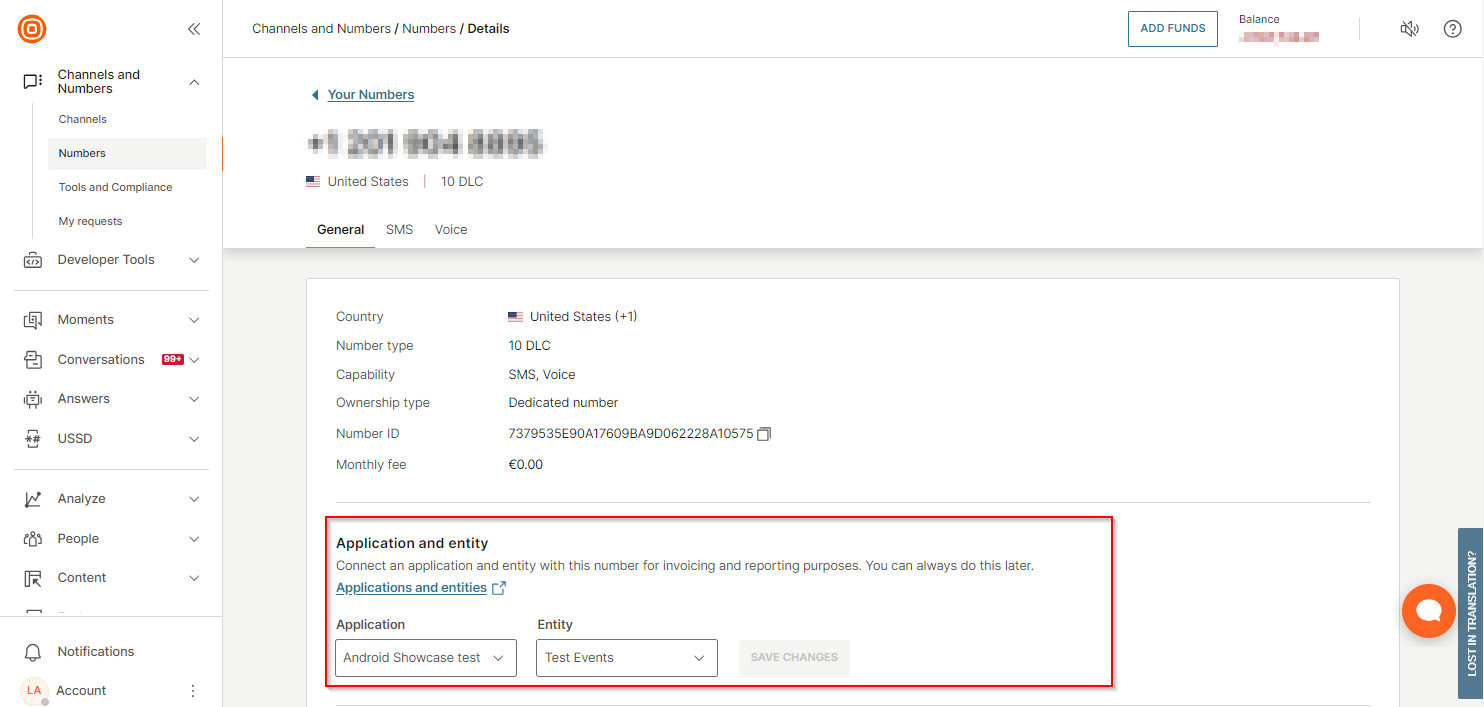
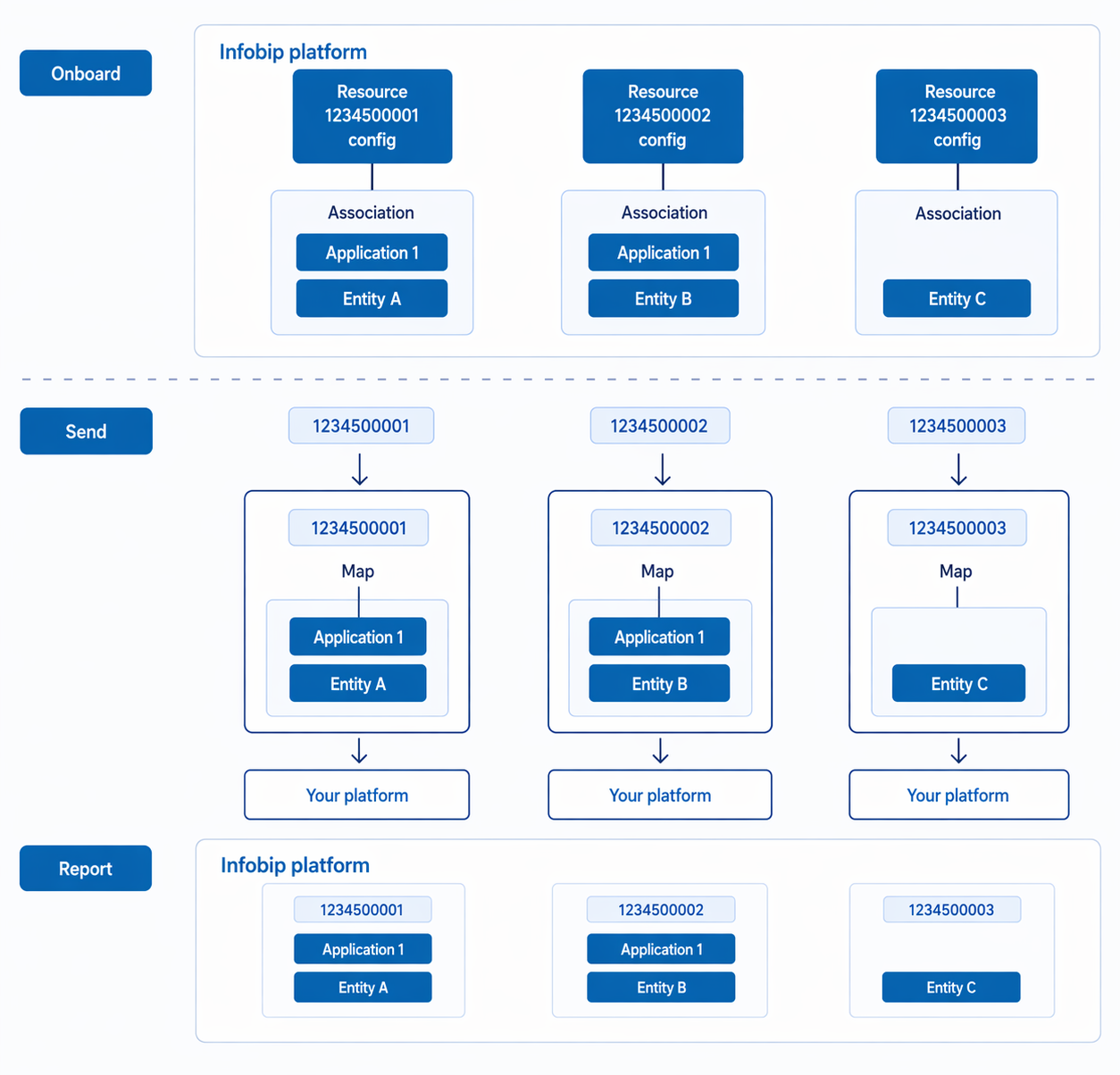
For inbound messaging, the association you specify during resource acquisition automatically applies to inbound message handling. All inbound traffic on that resource is automatically tagged with the associated application/entity without additional setup. Associations are also used for service management updates, such as RCS sender status changes or sender launch update webhooks. See Inbound message handling for detailed configuration by resource type (short codes, VLNs, keywords).
For outbound messaging, you specify the application and entity in each API request. If you have resource associations and sending strategies configured, the system automatically selects the right sender based on the application/entity and message properties (country, channel). See Outbound message sending for both approaches.
For sending strategies, resource associations are the foundation for automatic sender selection. They link your resources to applications and entities so that sending strategies can route messages to the right sender based on destination country and channel. See Understanding sending strategies for how associations and strategies work together.
USA SMS numbers in CPaaS X [#usa-sms-numbers-resource-acquisition]
For US SMS (10DLC, Short Code, and Toll-Free), all number types require brand registration, brand vetting, and campaign approval before you can send traffic. During this registration process, you can associate each number with a specific application and entity, enabling per-customer billing and traffic attribution in your CPaaS X setup.
The workflow involves buying the number, registering a brand with The Campaign Registry (TCR), obtaining campaign approval from mobile operators, then associating the number with a CPaaS X application and entity. See Understanding USA sender registration for complete procurement guidance and campaign approval processes.
To create and manage resource associations, see Configure sending strategies.
Inbound message handling [#inbound-message-handling]
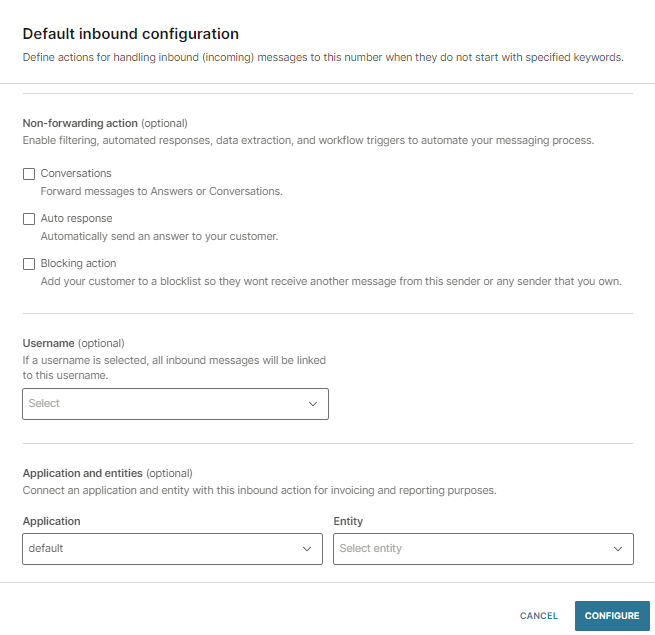
How inbound messages are tagged depends on resource type and configuration. To configure inbound message handling, in the Infobip web interface, go to Channels and Numbers > Numbers, select the number you want to configure, and select the channel tab (for example, SMS) to access the Default inbound configuration settings. You can also use the Manage inbound configuration API endpoint.
Two-way resources [#two-way-resources-inbound]
Any resource that supports two-way messaging (numbers, email domains, RCS senders, and select digital channel senders) can be associated with applications and entities for inbound message routing. When configured:
- The resource is associated with an application, and optionally a specific entity, during setup.
- All inbound traffic on that resource is tagged with the associated application/entity.
- Usage and reporting are attributed accordingly.
Most common for multi-tenant: Phone numbers (all USA SMS types: 10DLC VLNs, short codes, toll-free; plus non-USA VLNs) due to their dedicated and shared allocation flexibility.
Resources and inbound traffic with a dedicated number
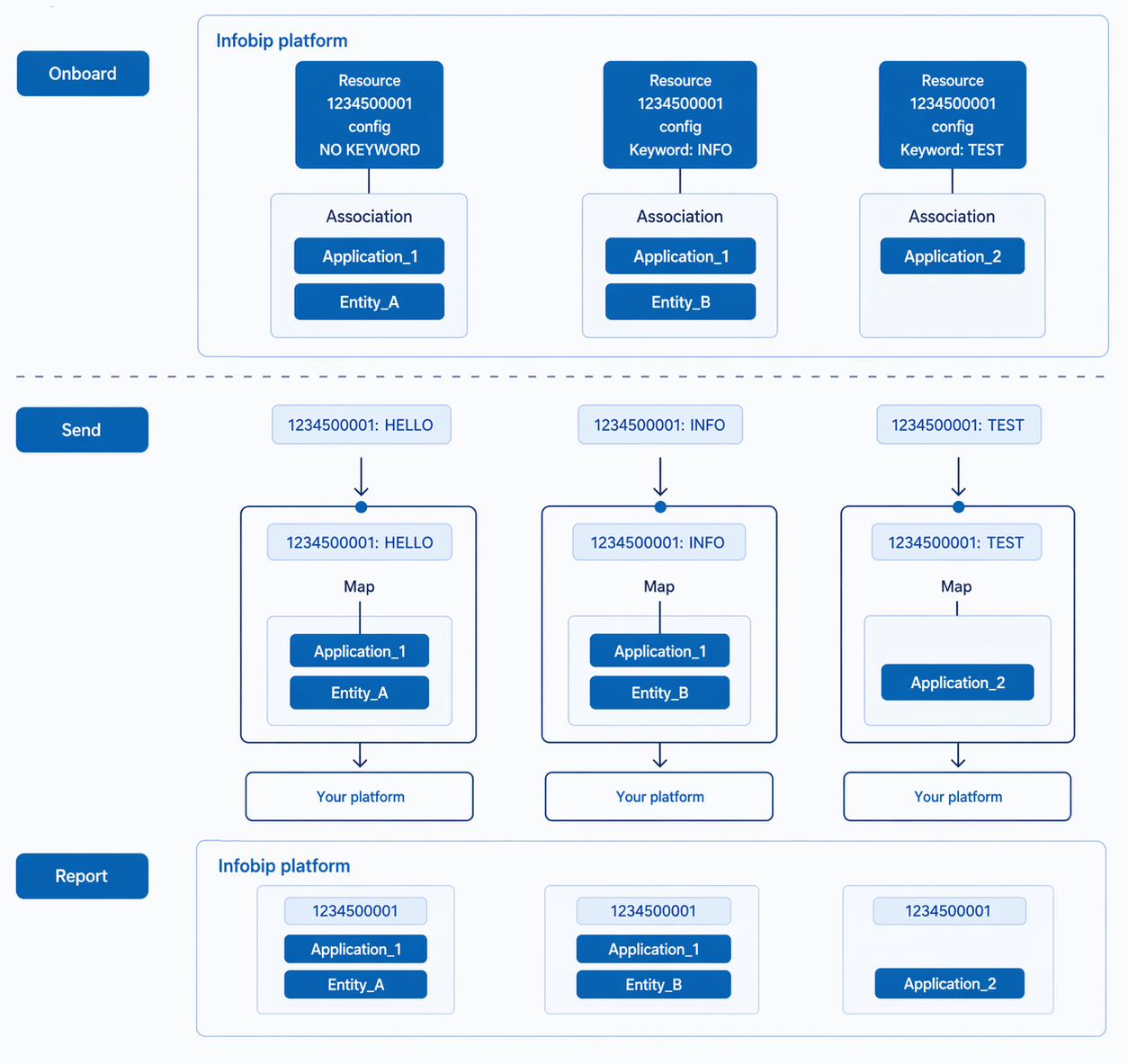
Keywords on numbers [#keywords-inbound]
Configure each keyword on a number with a different application/entity pair. This allows a single number to serve multiple business units or customers:
| Number | Keyword | Routes to | Use case |
|---|---|---|---|
| +1-555-0001 | ALERTS | Entity A | Finance team |
| SUPPORT | Entity B | Support team | |
| PROMO | Entity C | Marketing team |
Resources and inbound traffic with keywords
Outbound message sending [#outbound-message-sending]
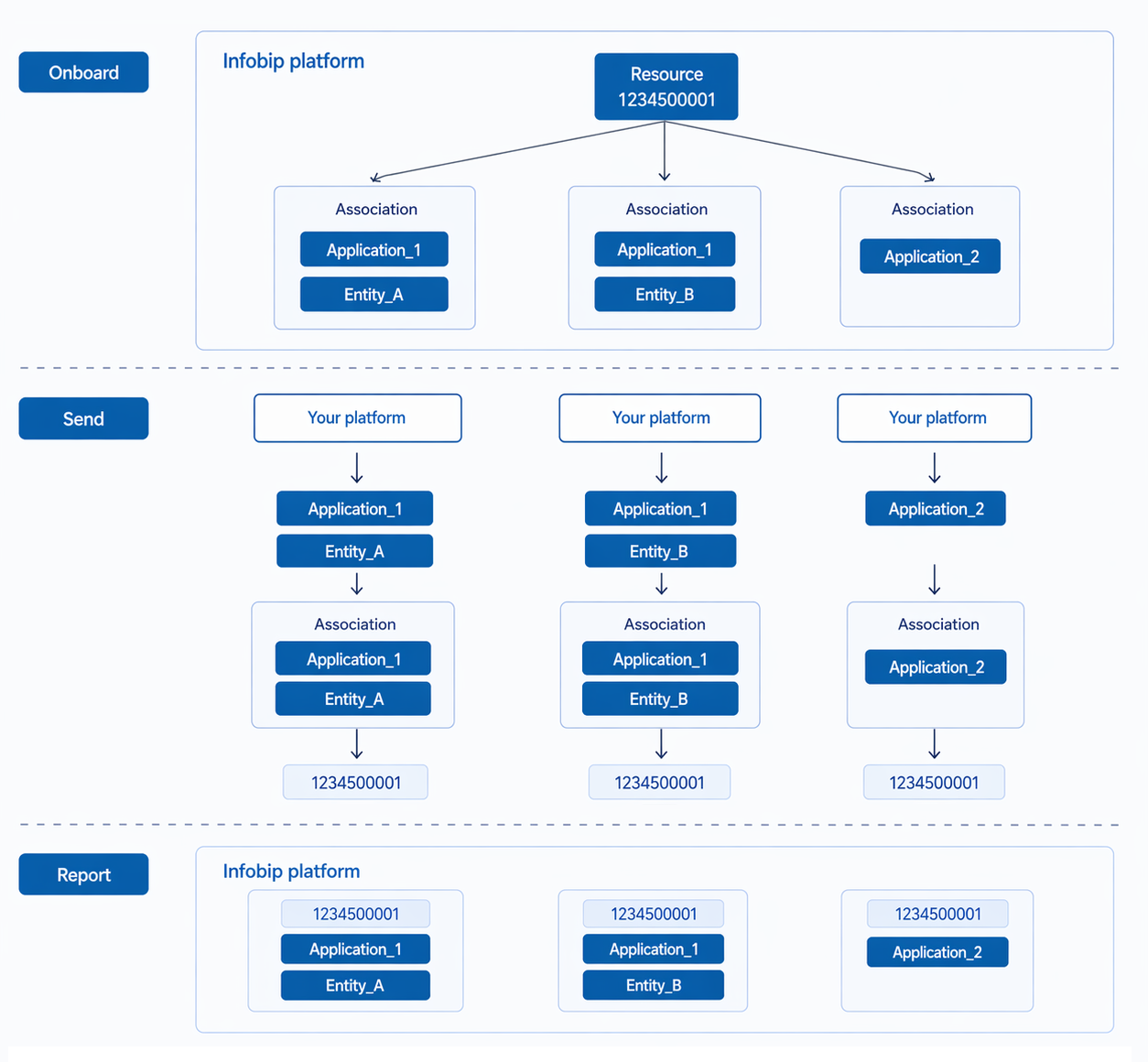
When sending messages, you can tag outbound traffic with applications and entities in two ways:
| Aspect | Explicit tagging | Implicit tagging (associations + strategies) |
|---|---|---|
| How it works | Include applicationId and/or entityId in every API request, and specify the sender | Include applicationId and/or entityId in every API request. Sending strategies automatically select the right sender based on the application/entity and message properties. |
| Sender selection | You specify the sender in each request | The system selects the sender based on resource associations and message properties (country, channel) |
| Best for | Simple setups, single-channel, full control over sender | Multi-country, multi-channel, automated routing at scale |
| Setup required | None. Pass parameters in requests. | Resource associations + sending strategy configuration |
Resources and outbound traffic
For detailed information on strategies and advanced routing patterns, see Sending strategies.
Resource ownership and allocation models [#resource-ownership-and-allocation]
In a multi-tenant platform, allocate resources based on customer tier. Phone numbers naturally support both shared and dedicated allocation (see Dedicated and shared numbers), while other resource types may be dedicated only.

Shared resources
One resource used by multiple entities. Cost-effective for small customers. Each entity usage is tracked separately, with all inbound and outbound traffic properly attributed.
Example: Single phone number with keywords routing different customers to different entities.

Dedicated resources
Resource exclusively associated with one entity. Branded communication with the customer's own sender ID. Higher cost, better for enterprise or high-volume customers. Complete isolation at the resource level.
Example: Phone number purchased and associated exclusively with one customer.

Hybrid approach
Shared resources for standard tier customers, dedicated resources for premium tier. Common pricing model for tiered SaaS platforms.
Example: Small customers share alphanumeric senders; enterprise customers get dedicated 10DLC numbers.
Resource distribution across client environments
Applications and entities
Learn about the organizational structure.
Sending strategies
Resource associations and intelligent routing.
Resources and numbers overview
Complete resource types and management guide.