Configure sending strategies
Set up resource associations and sending strategies to enable automatic, intelligent message routing in CPaaS X. For a conceptual overview, see Sending strategies.
Prerequisites [#prerequisites]
To configure sending strategies, you need:
- An active Infobip account with CPaaS X enabled.
- At least one application and entity created. See Manage applications and entities.
- Communication resources (phone numbers, sender IDs, email domains) purchased or registered through Infobip.

Resources must be purchased or registered through Infobip before they can be associated with applications and entities. Regional restrictions apply.
- SMS and MMS resources: See SMS coverage and connectivity.
- Email domain setup: See Email domain strategy.
Create and manage resource associations [#manage-resource-associations]
Resource associations link your communication resources (phone numbers, sender IDs, email domains) to your applications and entities.
To create a resource association:
- In the Infobip web interface, go to Developer tools > Applications and entities.
- Select the Resources tab.
- Select the resource type: Numbers, Alphanumeric senders, or Domains.
- Select the specific resource from your available resources.
- Select Associate resource.
- In the dialog, select the Channel, enter the Application ID, and optionally the Entity ID.
- Select Associate resource to confirm.
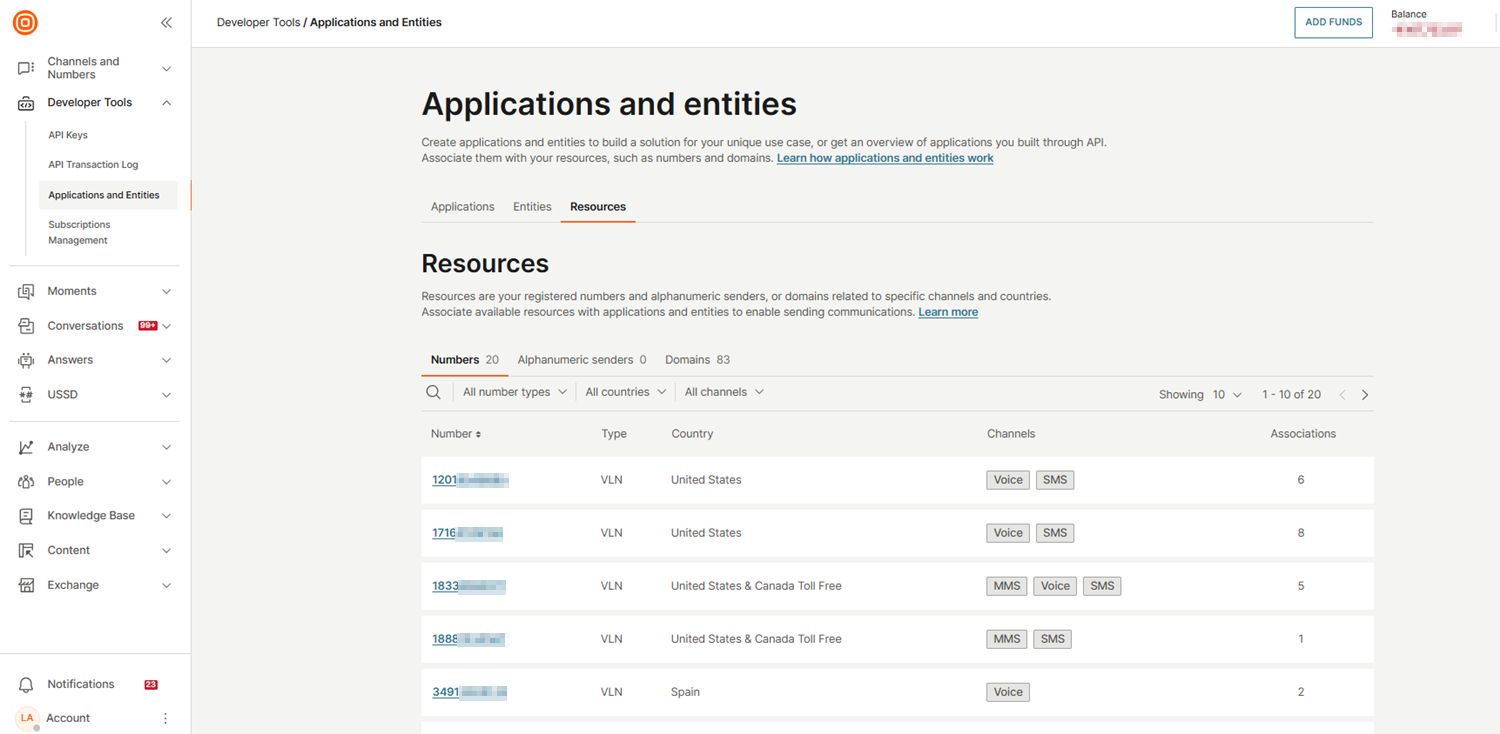
To view resource associations:
- In the Infobip web interface, go to Developer tools > Applications and entities.
- Select the Resources tab.
- View all resource associations in the list.
- Optionally, use filters to narrow results by application, entity, or resource type.
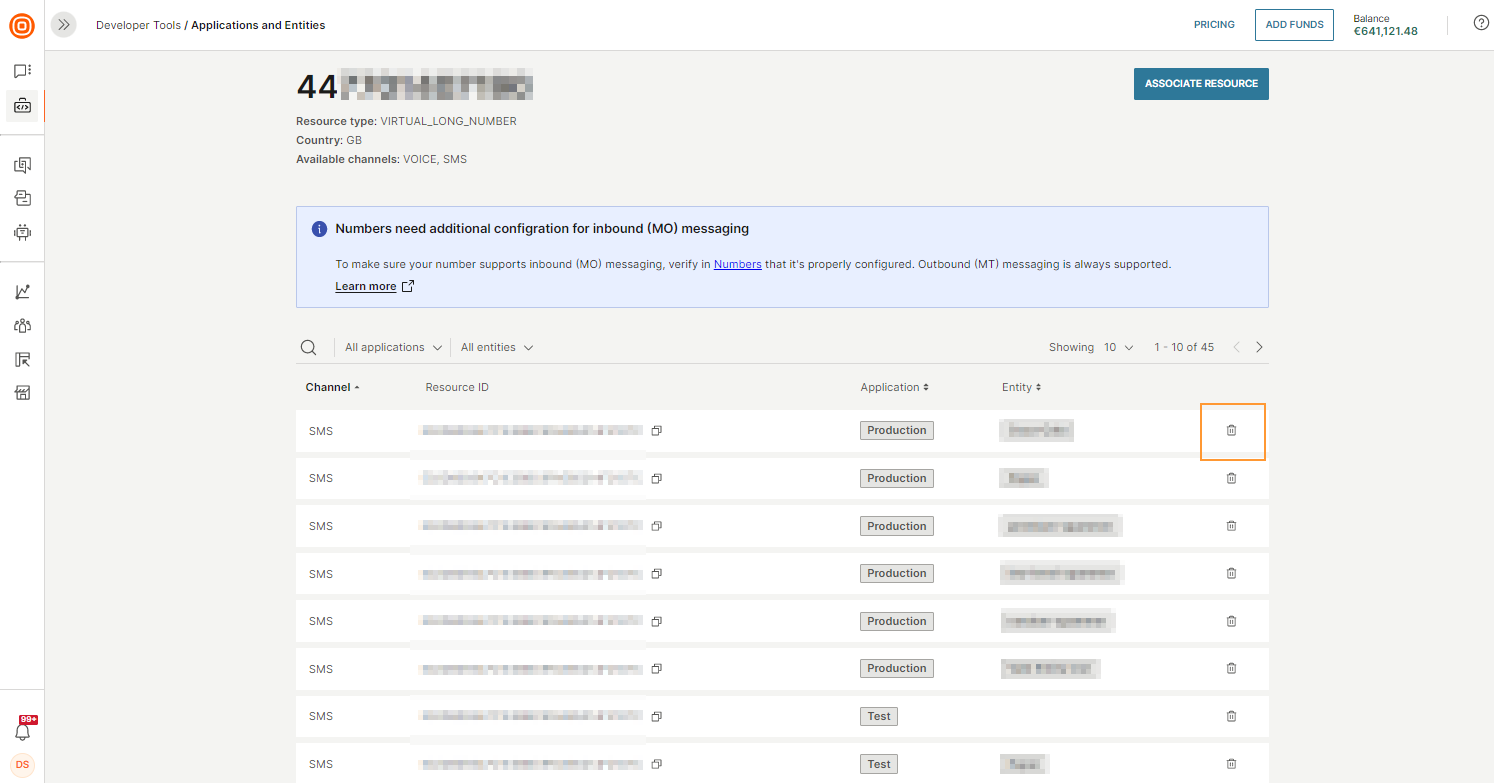
To delete a resource association:
- In the Infobip web interface, go to Developer tools > Applications and entities.
- Select the Resources tab.
- Find the resource association you want to delete.
- Select the Delete icon (trash can).
- In the confirmation dialog, select Confirm.
Use the Application and Entity Management API to:
- Create a resource association: Link a resource (
NUMBER,DOMAIN,ALPHA,RCS_RESOURCE, orAPPLE_RESOURCE) to an application and channel - Get all resource associations: Filter by application, entity, channel, resource type, or resource ID
- Get a specific resource association: Look up an exact match by all required fields
- Delete a resource association: Remove the link between a resource and an application/entity
The resourceId value depends on the resource type: use numberKey for number, or domainName for domain (Email only). If no entity is associated with the resource, set entityId to null.
Resource associations cannot be modified after creation. To change one, delete it and create a new one.
Create and manage sending strategies [#create-and-manage-sending-strategies]
Sending strategies are created and managed exclusively through the API. There is no web interface for sending strategy management.
Use the Sending Strategy API to:
- Create a sending strategy: Define channel, country, sender type priorities, sticky sender, and geolocated sender options
- Get sending strategies: Filter by strategy ID, application, or entity with pagination
- Delete a sending strategy: Specify the strategy ID in the request path
Supported channels: SMS, MMS, RCS. Leave channel empty to apply the strategy to all supported channels.
Sending strategies cannot be modified after creation. To change a strategy's configuration, delete it and create a new one.
When the from field (sender) is defined along with application and/or entity in the sending API call, it overrides the sending strategy configuration and the system does not apply sender manipulations.
Explore the full API reference for all available endpoints, request/response schemas, and filtering options.
- Resource associations: See the Resource Associations API reference.
- Sending strategies: See the Sending Strategy API reference.
Sending strategies
Scope types, features, and when to use each.
Manage applications and entities
Create the applications and entities your strategies use.
Secure your CPaaS X setup
Scope API keys for access control.