Speech to text to speech
EARLY ACCESS
Voice AI agents is available as an Early Access feature. To get access or learn more, contact your dedicated account manager or Support.
If you selected Speech to text to speech, configure the following fields.
Agent and voice settings
Set how the agent greets the caller and the voice it uses to speak its responses:
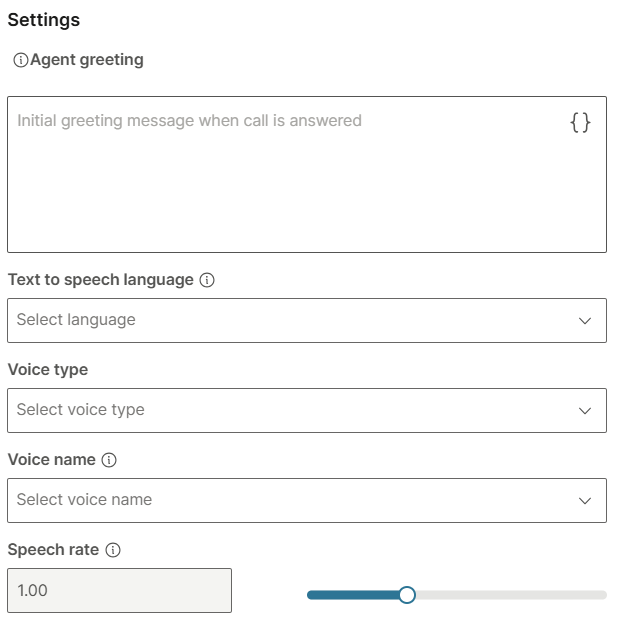
- Agent greeting: Initial greeting message that triggers the agent when the call is answered.
- Text to speech language: This is a mandatory field. The language used for text to speech conversion.
- Voice type: The voice used when converting text to speech.
- Voice name: Select the voice name.
- Speech rate: Adjustable speed of speech. The default value is 1.00.
Transcription
Set the language and provider used to convert the caller's speech to text.
Configure the following fields:
- Speech to text language: This is a mandatory field. The language used for speech recognition.
- Speech to text provider: The provider used for speech recognition.
Inactivity handling
Use these settings to control what the agent does when the caller stops responding. After a period of silence, the agent sends a re-engagement prompt to keep the conversation moving. If the caller stays silent after the configured number of retries, the agent ends the call or returns control to the journey.
Configure the following fields:
- Timeout: Set how many milliseconds of caller silence to allow before the agent sends a re-engagement prompt. Tune this against your normal round-trip latency so the prompt does not fire while the caller is still waiting on a response.
- Retries after timeout: Select how many times the agent re-engages a silent caller before it ends the call or returns to the journey.
Silence settings
Use these settings to cover the silence that occurs while the agent processes a request. Instead of dead air, the agent can play a message or sound while it works.
Configure the following fields:
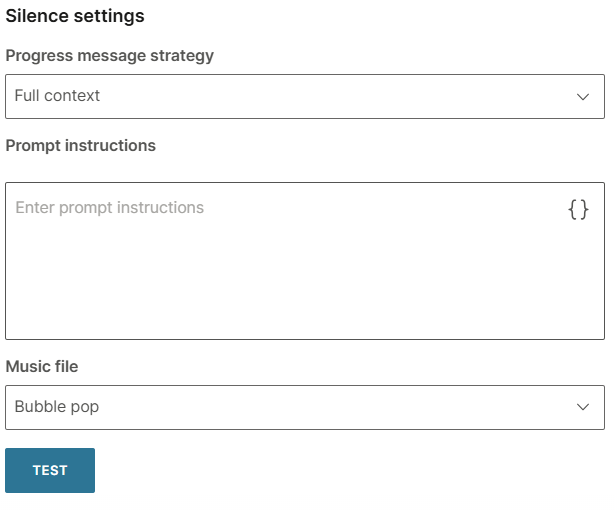
- Progress message strategy: This is a mandatory field. Select how the agent handles processing pauses: Omit, Static, or Full context.
- Prompt instructions: Available when Progress message strategy is set to Full context. Enter instructions that shape the contextual progress messages the agent generates. Select the
{}control to insert variables. - Music file: Select a predefined background sound to play while the agent processes the request.
- Test: Select Test to preview the selected progress message behavior and sound.
After configuring all the fields, select the check mark to validate your input.