Inbound messages: subscription routing
Webhook subscriptions provide centralized configuration for inbound messages across multiple communication channels. Instead of configuring inbound handling separately for each resource, define subscription-based rules that apply uniformly while maintaining flexibility for channel-specific requirements.
Why use subscriptions for inbound messages [#why-subscriptions-for-inbound]

Centralized management
Configure inbound handling at the channel level. One subscription covers all resources on that channel, eliminating per-resource setup and reducing configuration overhead.

Unified event handling
Manage inbound messages alongside delivery confirmations, link clicks, and bounces in one place. A single subscription framework handles all event types for a channel.

Multi-tenant routing
In CPaaS X environments, direct inbound messages to different endpoints based on application or entity. Resource-level overrides take precedence when you need exceptions.
Configuration hierarchy [#configuration-hierarchy]
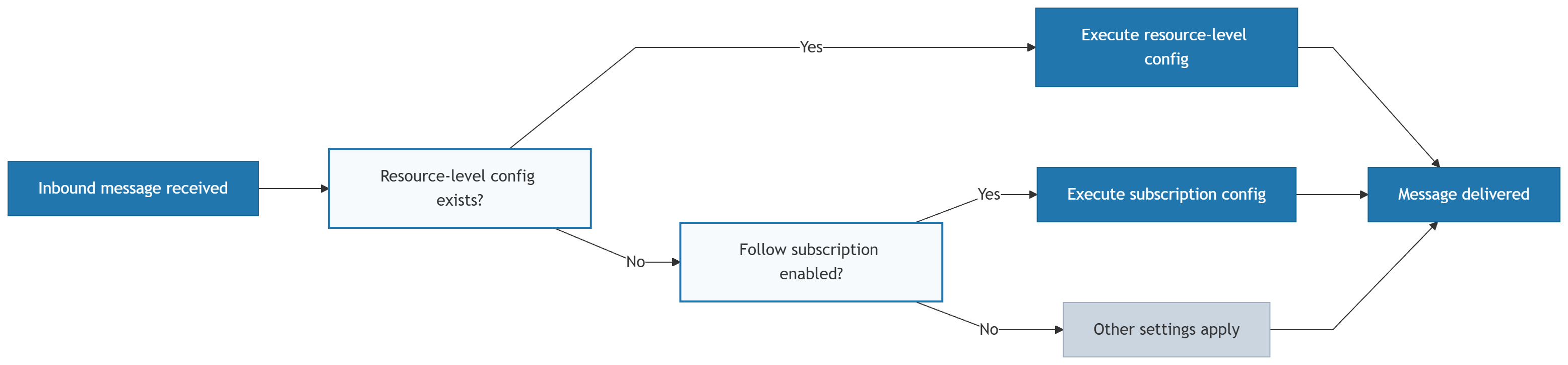
When an inbound message arrives, the system follows a priority-based decision process to determine how to handle it:
- Resource-specific (highest priority): If a resource has a resource-level action (forward to HTTP, email, or SMPP), the system executes it immediately. This overrides all subscription settings.
- Apply subscription: If no resource-specific configuration exists but "Apply subscription" is set as the inbound action, the system applies your centralized subscription rules for that channel.
- Non-forwarding actions (always run): Auto-response, blocking, and conversations execute in parallel regardless of which routing decision the system makes.
Standalone notification profiles apply only to outbound (MT) events. Resource-level forwarding URLs for inbound messages do not use standalone notification profiles.
Inbound message decision flow
Configuration options for resources [#configuration-options]
When setting up inbound message handling for a resource, choose one of three approaches:

Resource-level forwarding
Set up a specific action for that resource only. Takes highest priority and overrides subscriptions. See Managing resources: Configure inbound message handling.
Apply subscription
Use the subscription settings defined for that channel. Enables centralized configuration while maintaining per-resource control.

No configuration
If neither resource-level nor subscription configuration exists, inbound messages are handled by other configured settings such as active subscriptions for non-forwarding actions.
How subscription-based inbound routing is configured [#setup]
Create a subscription
Set up a webhook subscription for each channel where you want to manage inbound messages. Include INBOUND_MESSAGE among the selected event types. See Manage webhook subscriptions.
Set "Apply subscription"
For each resource where you want to use subscription settings, configure the inbound action as "Apply subscription". See Managing resources.
Test the setup
Send test messages to your resources and verify that inbound messages arrive at the correct webhook endpoint.
Understanding webhook subscriptions
Core concepts, filtering, and how subscriptions work.
Available webhook events
Find inbound message and other event types by channel.
Manage webhook subscriptions
Create, update, and delete subscriptions.
Manage notification profiles
Configure webhook URLs and delivery settings.
Manage event formats
Control inbound message payload structure by channel.