Manage event formats
Format selection defines the JSON payload structure of events delivered to your webhook. Each subscription automatically uses a default format for its channel, but you can select a different format if your webhook receiver requires a specific API version or structure.
Prerequisites [#prerequisites]
To manage event formats, you need:
- Infobip account: An active account.
- Webhook subscription: At least one subscription configured. See Manage webhook subscriptions.
- Channel awareness: Knowledge of which channels your subscription monitors (default formats vary by channel).
Format selection overview [#format-selection-overview]
Each subscription automatically receives a default format (event schema), which is channel-specific to ensure consistent processing of events. If the default format does not meet your requirements, you can select a different supported format for available channels.
This allows you to:
- Control the JSON payload structure delivered to your webhook
- Use formats that match a specific API version your webhook expects
- Receive payloads that automatically adapt to the API version you used to send the original message
- Ensure compatibility with your webhook receiver logic
Default formats by channel [#default-formats]
Each channel uses a predefined JSON format to structure inbound messages:
| Channel | Default format | Payload example |
|---|---|---|
| SMS | MO_JSON_2 | SMS API: Receive inbound SMS messages |
| MMS | MO_MMS_2 | MMS API: Receive inbound MMS messages |
MO_OTT_CONTACT | WhatsApp API: Receive inbound WhatsApp messages | |
| RCS | MO_RCS_JSON | RCS API: Receive incoming RCS messages |
| Facebook Messenger | MO_OTT_MSISDN | Messenger API: Receive incoming Messenger messages |
| LINE | MO_OTT_MSISDN | Not available |
| TikTok | MO_OTT_MSISDN | TikTok API: Receive TikTok inbound message |
| Viber Business Messages | MO_OTT_MSISDN | Viber API: Receive inbound Viber messages |
| Apple Messages for Business | MO_OTT_CONTACT | AMB API: Receive incoming AMB messages |
| Zalo | MO_OTT_MSISDN | Zalo API: Receive incoming Zalo messages |
Selectable formats [#selectable-formats]
Formats fall into two types:
- Static formats deliver a fixed payload structure tied to a specific API version (for example,
delivery.sms.v3.json). All events use the same schema regardless of how the original message was sent. - Adaptive format (
adaptive.subscription.format) dynamically matches the payload to the API version the sender used to submit the original message.
Selectable formats are available for the following channels and services:

Messaging channels
Apple Messages for Business, Facebook Messenger, MMS, SMS, Open Channel

Platform services
Mobile Identity, Blocklist
For other channels, the default format is applied automatically. To change the format for other channels, contact Infobip Support.
Available formats by source [#formats-by-source]
Expand a channel or service to view its selectable formats and the payload each one produces. Use the tabs to switch between categories.
For other channels and platform services, see Available webhook events for the complete list of events.
Select a format [#select-format]
You can select a different format when creating or editing a subscription.
- Log in to the Infobip web interface and go to Developer Tools > Subscriptions Management.
- Find your subscription in the list.
- Open the three-dot menu next to the subscription name and select Edit.
- On the Select events screen, choose your preferred format from the list.
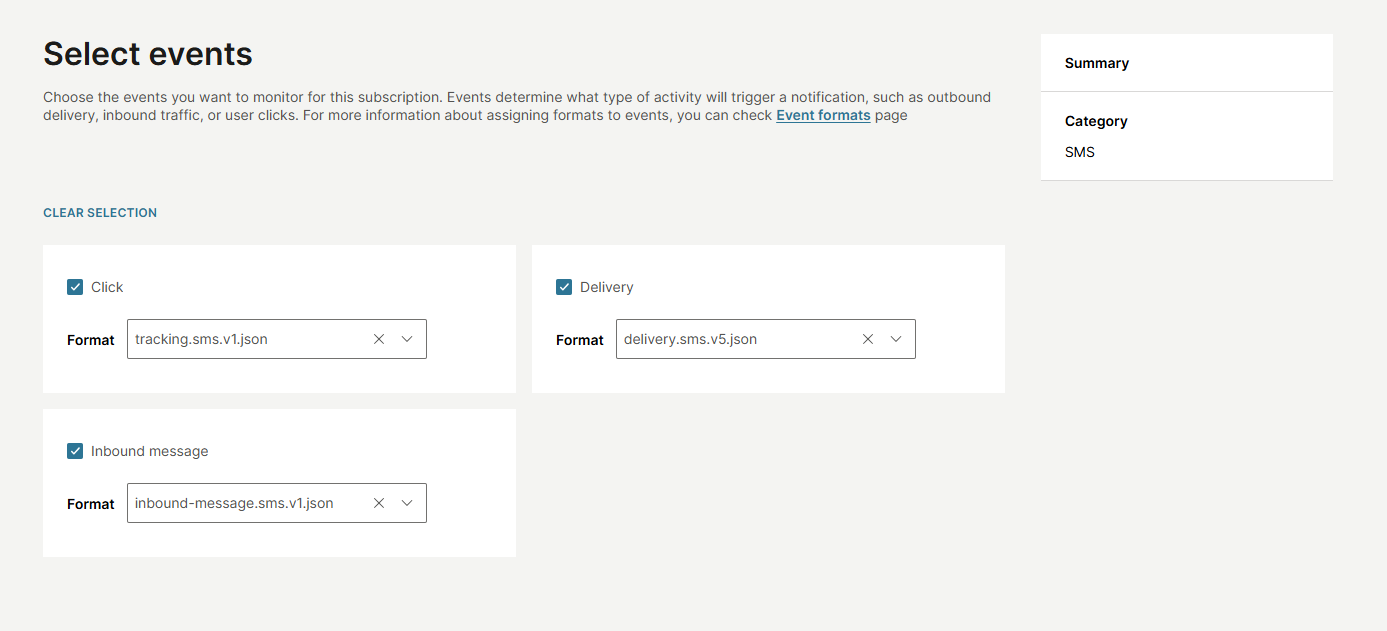
- Save your subscription to apply the new settings.
Configure formats when creating or updating a subscription by including the format field in the events object.
Without a format (default applied):
With a selected format:
If the format field is not provided, the system automatically assigns the default format for that event and channel.
For complete API documentation, see the Subscriptions API.
When to use each format type [#when-to-use]
Use static formats when
Your webhook receiver expects a specific API version structure. You want predictable, unchanging JSON payloads. You are migrating from a specific API version and need backward compatibility. You want consistency across all events of that type.

Use adaptive format when
You support multiple API versions in your webhook receiver. You want payloads to match the API version each sender used. You need flexibility as senders update their API versions. Your webhook can handle variable JSON structures.
Understanding webhook subscriptions
How subscriptions work and filtering options.
Manage webhook subscriptions
Create and configure subscriptions.
Inbound message routing
Route inbound messages through subscriptions.
Available webhook events
Complete event reference across all channels and services.