Use WebSocket streaming
WebSocket audio streaming transmits real-time audio data over the internet using the WebSocket protocol. It establishes a persistent, bidirectional connection between client and server, enabling continuous audio exchange for applications, including live voice chat, interactive voice response systems, and real-time audio monitoring. This connection and efficient data transfer result in lower latency and improved performance compared to traditional methods.
Streaming options
Infobip Calls API supports integrating with external media processing services through WebSocket streaming. It offers two distinct options depending on your use case.
Streaming media action
- Initiates and stops on a specific call leg.
- Duplicates the audio stream from that call leg to an external service, with the option to perform media replacements.
- When media replacement is active, the original audio of that call leg is replaced by audio from the external service, so other participants in the conference or dialog hear the replaced audio instead of the original stream.
- Typical use cases:
- Streaming a designated call leg's audio to an external speech transcription or sentiment analysis service.
- Using an external AI service to modify a designated call leg's audio and replace it. Example: profanity filtering or voice enhancing.
WebSocket endpoint
- Adds the external media processing service as a separate participant in a conference or dialog.
- Receives audio from all unmuted participants.
- Any audio generated by the external service is heard by every participant in that conference or dialog.
- Typical use cases:
- Integrating a conversational AI service (voicebot) into a conference or dialog.
- Streaming all participants' audio to an external transcription service that supports speaker diarization.
- Streaming all participants' audio to an external recording service.
- Streaming all participants' audio to an external broadcasting service.
You can incorporate real-time audio processing or other advanced media capabilities into your Infobip Calls application using these integration methods.
Streaming media action
You can use Calls API to stream outbound call media from your application to an arbitrary host using a WebSocket. Only audio streaming is supported.
Audio streaming is configured on a per-call leg basis. Before you initiate the stream, you need to create at least one new media stream configuration. Then use the configuration ID within a call to start or stop streaming media. Media is streamed as a series of raw bytes.
Streaming without media replacement
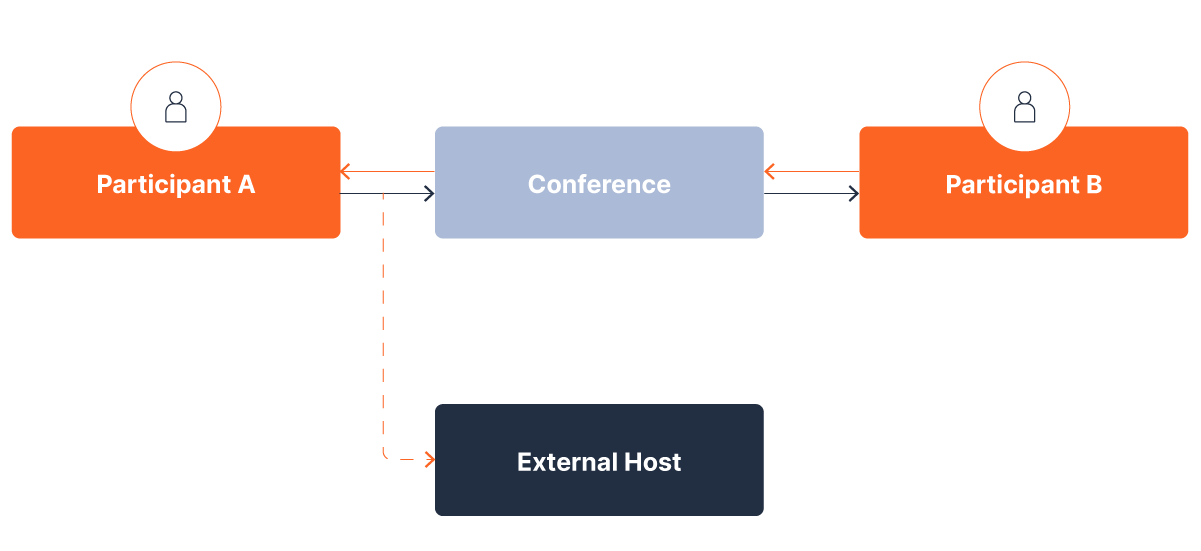
The following diagram shows streaming without media replacement. Consider 2 participants speaking with each other over a conference bridge, and the audio of participant A must be routed to an external transcription service while participant B must still hear participant A as is. Streaming without media replacement simply streams (forks) the outbound media to another listener.
Streaming with media replacement
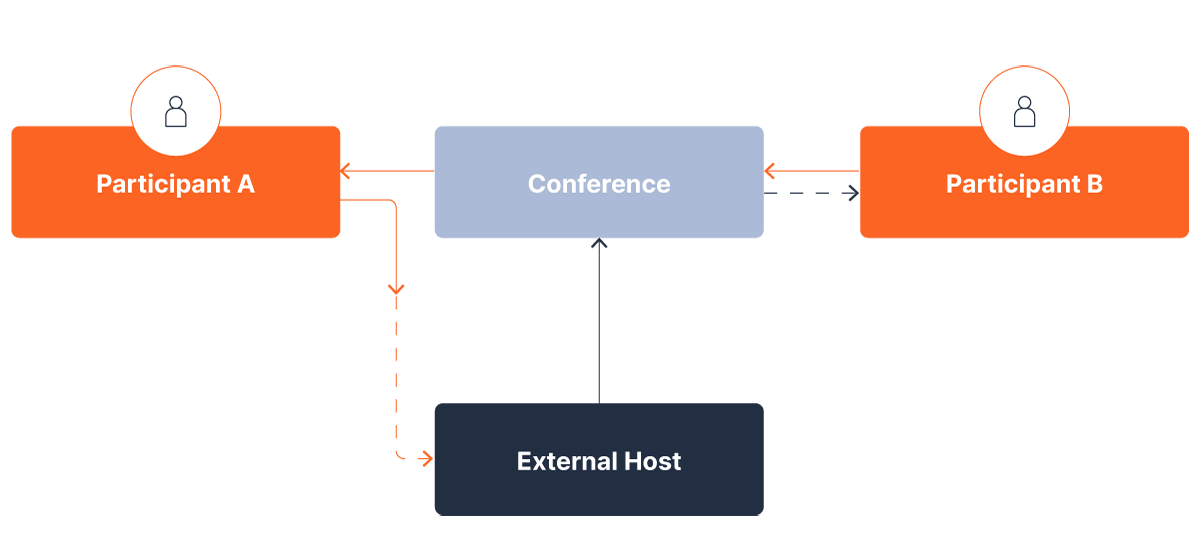
Using the same example as above, the external host's role is to offer services such as audio filtering (voice changer, profanity filter, and so on). In this case, the modified audio is injected into the conference and this is the audio that all participants of this conference hear.
Create a media streaming configuration
First, create a media stream configuration object. Within this object, specify the URL of the WebSocket host, as well as the authorization required to access it (if any):
Both ws and wss are supported. The response contains the ID of the newly created MediaStreamConfig object.
To start streaming media during a call, create a start-media-stream request. Within the request, specify the ID of the previously created configuration and specify whether the host replaces the media:
If everything is successful, the first message that your host receives is:
This message contains the following fields:
- callId: The corresponding callId. Useful when your host might be dealing with multiple calls.
- sampleRate: The sampling rate of audio being streamed. Expressed in units of kilo-hertz (kHz). The default is 48kHz.
- packetizationTime: The time elapsed between two successive packages being sent to your host. Expressed in units of milliseconds (ms). The default is 20ms.
- customData: In development (not fully supported).
Parse incoming audio streams
After sending the initial message upon establishing a connection, the Infobip platform continues to send audio packets to your host. Packets are sent every packetizationTime seconds (the value you entered in this field). The packets contain only pure audio.
For 48kHz sampled audio, 20ms of audio contains:
- number_of_samples = 48kHz x 20ms = 960 samples
Audio is streamed raw, meaning each audio sample is encoded as a 16-bit signed integer, which is represented as a 2-byte value. This means every incoming message should ideally contain 1920 bytes (960x2). However, if there are any network issues, it can happen that more than one packet is sent within a message. These packets are guaranteed to be multiples of 1920 bytes (3840, 5760, 7680, and so on).
Media replacement
If your media stream request is configured to replace media, the Infobip platform expects you to send back packets of 1920 bytes. Note that even when network errors occur and multiple packets are sent as a single cluster, your host should always send back packets of 1920 bytes. These packets are injected into the call and distributed to other participants. Therefore, when media replacement is active, you only need to send back a single stream of media, and the Infobip platform delivers it to other participants in the call.
If media replacement is not set, the Infobip platform ignores any incoming messages from the host.
WebSocket endpoint
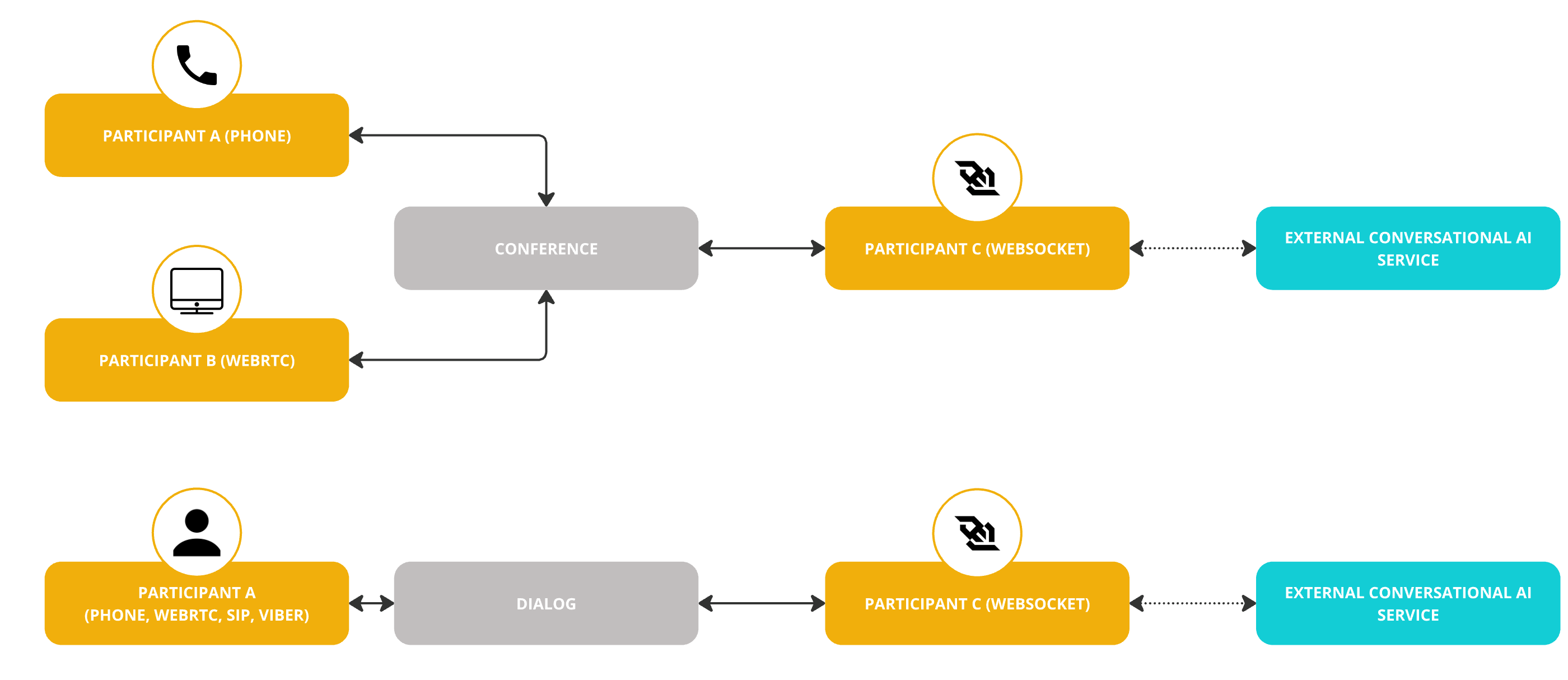
You can use the WEBSOCKET endpoint to create outbound call legs to an external media service over WebSocket. As a call leg, it can be joined to:
- A conference with multiple participants.
- A dialog with a single participant.
This is possible regardless of the participants' respective endpoint types (PHONE, SIP, WEBRTC, VIBER, WHATSAPP).
Create a WebSocket endpoint configuration
To enable WebSocket streaming, create a WebSocket streaming configuration object. Within this object, specify the URL of the WebSocket host and set the configuration type to WEBSOCKET_ENDPOINT.
If the WebSocket endpoint requires authentication, note that Infobip supports this using customData key-value pairs. The WebSocket endpoint must allow the connection so that a websocket:connected event that includes customData can be sent.
Connect a WebSocket endpoint
WEBSOCKET call legs can be started with methods such as create call, connect with new call, add new call, and create dialog. When creating an outbound call of type WEBSOCKET, provide a WebSocket configuration ID.
When you create a call leg of type WEBSOCKET, any key-value pair defined in customData is sent to the WebSocket server as part of the websocket:connected event. The maximum length for customData is 512 bytes.
WebSocket messages
WebSocket messages are functionally equivalent to SIP signaling and RTP packets, with text messages that handle signaling and binary messages that carry media data.
The initial message sent on an established WebSocket connection is text-based and contains a JSON payload:
After the initial text message, subsequent messages can be text (DTMF digits) or binary.
The audio codec supported on the WebSocket interface is Linear PCM 16-bit, with sample rates of 8kHz, 16kHz, 24kHz, or 32kHz, and a 20ms frame size.
| Sampling rate | Number of samples in 20ms | Bytes per message |
|---|---|---|
| 8000 | 160 | 320 |
| 16000 | 320 | 640 |
| 24000 | 480 | 960 |
| 32000 | 640 | 1280 |
If any party on the call connected to the WebSocket sends a DTMF tone, this triggers an event on the WebSocket. This event is a text message with a JSON payload, interleaved between the audio frames, and has the following format:
Write audio to the WebSocket
To transmit audio back into the call, send binary messages through the WebSocket. The audio format must match the specifications outlined in previous sections. Each message should be exactly 320, 640, 960, or 1280 bytes, depending on the sample rate, and must represent a 20-millisecond segment of audio.
Messages can be sent at a speed exceeding real-time playback, as the platform stores them in a buffer before they are played. This enables you to transfer an entire audio file in a single operation, provided you adhere to the message size requirement (320, 640, 960, or 1280 bytes). However, keep in mind that the buffer capacity is limited to 1024 messages, which equates to roughly 20 seconds of audio. If your file exceeds this duration, introduce a delay of approximately 18-19 milliseconds between each message to prevent data loss.
External media platforms that you want to integrate using WebSocket might work with different audio formats or support other event types. In these cases, you may need to develop a proxy application hosted by you to translate the WebSocket flows between Infobip and the external media server.