Voice and WebRTC
Infobip voice comprises a suite of communication tools tailored to enhance customer interactions across many channels, including mobile and web applications. The platform empowers businesses with the versatility to conduct audio calls to both landlines and mobile phones, ensuring a flexible and customizable communication experience that can be adapted to a wide range of business requirements and scenarios.
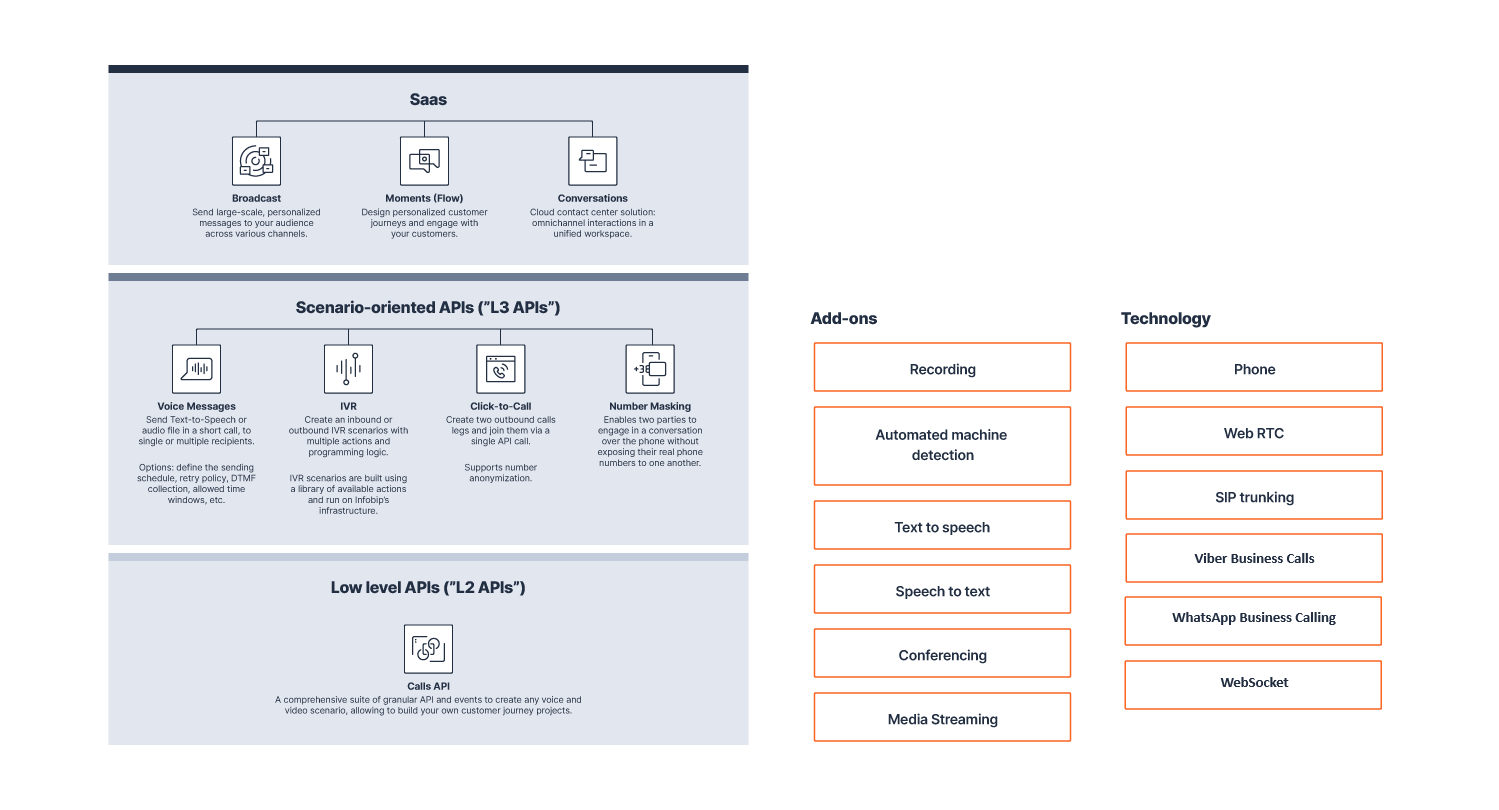
Voice offers many layers of functionality with a range of customization options, from low-level APIs to comprehensive SaaS solutions.
Get started with Voice and WebRTC [#get-started]
Start building voice experiences with Infobip. Set up your account, configure your first voice number, and send your first call.
Ready to make your first call?
Follow the step-by-step guide to send your first voice message or make your first call.
Need to configure voice numbers?
Learn how to configure inbound calls and set up voice numbers.
Explore voice APIs
Discover voice options like Calls, Voice messages, and IVR.
Connect your infrastructure
Learn about SIP trunking and call routing options.
Voice APIs
Build custom voice experiences with Infobip's comprehensive suite of voice APIs. From simple voice messages to complex interactive systems, these APIs provide the foundation for voice-enabled applications.
Use Voice and WebRTC with Infobip solutions
Integrate voice and video into your customer engagement workflows. Use Voice and WebRTC with Infobip solutions to automate voice interactions, manage contact center communications, and build personalized customer journeys.
 Inbox
Inbox Customer Profiles
 Chatbots
 Journeys
Voice connectivity
Connect your existing telephony infrastructure to Infobip's global voice network with enterprise-grade SIP trunking and intelligent call routing.
Voice in channels
Extend your voice capabilities into popular messaging channels. Enable voice calling through WhatsApp, Viber, and other over-the-top platforms.
Developer resources
Explore the voice APIs, SDKs, and documentation to integrate voice capabilities into your applications.
Need help?
If you get stuck, visit the Get started with Voice and WebRTC page to explore key setup instructions and examples.
Additional resources
Explore more tools and documentation to help you plan, integrate, and support your voice use case.
Essentials
Browse foundational guides for creating an account, managing users, setting up APIs, and ensuring connectivity in the Essentials hub.
Pricing
Estimate your voice communication costs with the interactive pricing calculator. Select Voice and choose your country to see rates by destination.
Support center
Browse troubleshooting guides and frequently asked questions in the Support center.
Use case library
Explore real-world examples in the Use case library to inspire your implementation.